CCTV HDD Calculator: Effortlessly Calculate CCTV Storage Needs.
CCTV HDD Calculator
More Tools: Online Tools for CCTV Security Systems
The CCTV HDD Calculator is a handy tool designed for security system professionals and enthusiasts to estimate the required hard drive space for CCTV Storage. Whether you are setting up a new surveillance system or upgrading an existing one, this calculator helps you plan for optimal storage capacity based on various parameters.
Main Factors That Decide Storage Size
Our calculator provides an accurate estimate by intelligently processing all the key factors that dictate the size of your video files. Understanding these variables is the first step to mastering your storage plan.
1. The Basics: Cameras, Hours, and Retention
- Number of Cameras: The most direct multiplier. A system with 16 cameras will require 16 times the storage of a single-camera setup, assuming all other settings are identical.
- Recording Hours Per Day: This defines your recording strategy. A system set to 24/7 continuous recording offers maximum security but consumes the most space. A system recording on motion detection might only be active for an average of 8-12 hours a day, dramatically reducing storage needs.
- Retention Days: This is your primary objective. How long must footage be kept before being overwritten? A retail store might need 30-60 days for liability purposes, while a homeowner might find 14 days sufficient.
2. The Visuals: Resolution and Frame Rate (FPS)
- Resolution (Clarity): Measured in pixels, this determines how much detail your video captures. As seen in the calculator’s dropdown (
1920x1080 / 1080P), Full HD is a common standard. While higher resolutions like 4K offer superior detail, they demand exponentially more storage. - Frame Rate (FPS) (Smoothness): This is the number of individual images captured per second. A rate of 20 FPS, as shown in the calculator, provides very smooth motion. Lowering this to 10-15 FPS can cut storage needs significantly while still being adequate for most surveillance scenarios. Conversely, 30 FPS is needed for fast-moving environments but doubles the data compared to 15 FPS.
3. The Engine: Video Encoding (H.265 / H.265+) Video encoding, or the codec, is the technology used to compress video data. Configuring the right CCTV encode settings is one of the most impactful factors for storage efficiency..
- H.264: The long-standing industry workhorse. It offers good compression but is being replaced by more efficient methods.
- H.265 (HEVC): The modern standard. It delivers the same video quality as H.264 but at roughly 50% of the data rate.
- H.265+: As shown in the calculator, this is an enhanced version of H.265, developed by manufacturers to push efficiency even further. It uses intelligent predictive encoding, drastically reducing the data rate in static scenes where little is changing. For a camera monitoring an empty hallway overnight, H.265+ can reduce storage consumption by up to 80% or more compared to H.264.
4. The Data Stream: Bit Rate Type (VBR – Recommended) This is a crucial, advanced setting that our calculator helps you manage. Bitrate is the amount of data used to encode one second of video.
- Constant Bit Rate (CBR): This allocates a fixed, constant amount of data for every second of video, regardless of what is happening on screen. This is inefficient for surveillance, as it wastes data on empty, static scenes.
- Variable Bit Rate (VBR): As the calculator recommends, VBR is a dynamic and intelligent approach. It allocates a very low bitrate when the scene is static (e.g., an empty office) and instantly increases the bitrate when complexity and motion are detected (e.g., a person walking through). This ensures high quality when it matters and massive data savings when it doesn’t, making it the superior choice for surveillance.
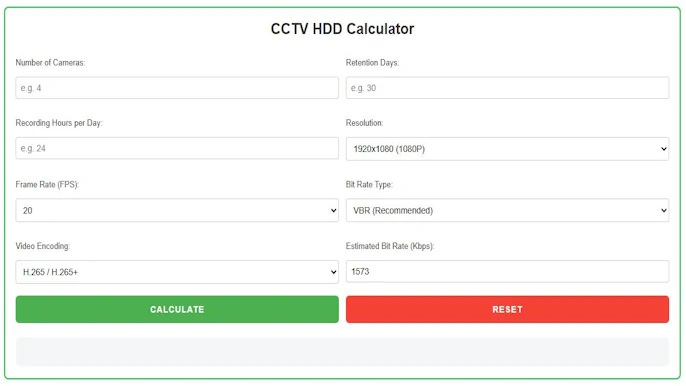
How to Use the CCTV HDD & Bandwidth Calculator: A Step-by-Step Guide
Our tool is designed to be intuitive, allowing you to quickly model your system’s requirements.
- Enter Your Core System Specs: Input the
Number of Cameras, your desiredRetention Days, and the averageRecording Hours Per Day. - Select Video & Stream Settings:
- Choose your desired
Resolutionfrom the dropdown menu (e.g., 1080P). - Select your
Frame Rate (FPS)(e.g., 20). - Choose your
Video Encoding. For modern systems, always selectH.265 / H.265+if your hardware supports it to maximize storage efficiency. - Select your
Bit Rate Type. For almost all surveillance applications, leave this on the recommended setting ofVBR.
- Choose your desired
- Calculate and Analyze: Click the green “Calculate” button.
- Estimated Bit Rate (Kbps): The tool first calculates the necessary bitrate per camera based on your selections. This value is also crucial for planning your network’s bandwidth capacity.
- Total Estimated Storage: The final result will be displayed, giving you the total HDD capacity needed in Gigabytes (GB) or Terabytes (TB).
The red “Reset” button allows you to instantly clear all fields and start a new calculation, making it easy to compare different configurations.
The Strategic Advantages of Planning with Our Calculator
- Eliminate Costly Guesswork: This tool provides a data-driven estimate, ensuring you invest in the right amount of storage—preventing both data loss from under-provisioning and wasted money from over-provisioning.
- Optimize Your System for Efficiency: The calculator’s real power lies in its ability to run “what-if” scenarios. Instantly see the massive storage savings of switching from H.264 to H.265+, or the effect of reducing the frame rate from 20 to 15 FPS. This allows you to make informed trade-offs between quality, performance, and cost.
- Plan Your Network Bandwidth: The “Estimated Bit Rate” output is a vital bonus. By multiplying this number by your total camera count—or by running the numbers through our dedicated CCTV bandwidth calculator—you can calculate the exact data load your network switch and internet connection (for remote viewing) will need to handle, preventing bottlenecks and performance issues.
- Ensure Continuous Recording: Accurate storage planning is only effective if your system stays powered on. We highly recommend pairing your storage estimates with our UPS backup time calculator to guarantee you never lose crucial footage during unexpected power outages.
In conclusion, the CCTV HDD & Bandwidth Calculator is more than a convenience—it’s an essential strategic planning tool. It empowers system designers, installers, and end-users to build surveillance solutions that are not only powerful but also intelligent, efficient, and perfectly tailored to their budget and security objectives.
