CCTV Recording Days Calculator – Get Accurate Recording Duration.
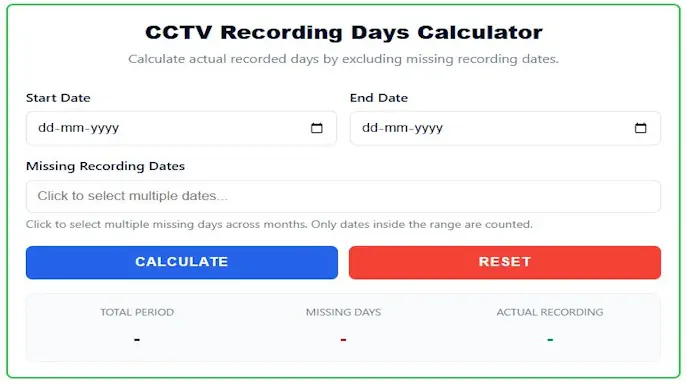
CCTV Recording Days Calculator
Calculate actual recorded days by excluding missing recording dates.
More Tools: Online Tools for CCTV Security Systems
The Ultimate Guide to Calculating Actual CCTV Recording Days
Ever looked at your DVR or NVR playback timeline and wondered, "How many days of actual footage do I really have?" It’s rarely a simple answer. When you buy a hard drive for your security system, the manufacturer or installer might advertise "30 days of continuous recording." However, in the real world of electronic security, 30 days of storage capacity seldom translates to 30 complete, consecutive calendar days of accessible footage.
Between motion-detection-only settings, scheduled weekend blackouts, planned storage overwrites, and unexpected system power gaps, your recording timeline is likely fragmented. Manually counting these days on a calendar—especially while trying to skip specific dates, weekends, or system downtime—is tedious, time-consuming, and frustratingly prone to error.
Our free CCTV Recording Days Calculator is a simple yet powerful online tool built to eliminate the guesswork. Whether you are an installer, an IT manager, or a business owner, this tool gives you a precise, instant audit of your actual video storage retention.
The Problem: Why DVR and NVR Storage is Rarely Linear
To understand why a recording days calculator is so essential, we first need to look at why your CCTV footage doesn't always flow in a perfect, uninterrupted line. Security professionals deal with several variables that create "missing days" in a recording archive.
1. Motion Detection (VMD) and Smart Recording
Most modern surveillance systems do not record 24/7. To save hard drive space, cameras are frequently set to Video Motion Detection (VMD) or smart event triggering (like line-crossing or human detection). If a warehouse is closed over a long weekend and no motion triggers the cameras, your NVR will not record anything. While you save storage space, your continuous "days of recording" count is interrupted.
2. Scheduled Recording Windows
Many corporate environments and retail stores configure their CCTV systems to record only during specific hours or days. For instance, an office might record from Monday to Friday, 7:00 AM to 7:00 PM, and turn off recording completely on Saturdays and Sundays. Over a month, you aren't getting 30 days of footage; you are getting 20 to 22 days.
3. Unexpected Power Outages and Hardware Faults
Even the best security systems experience downtime. A power outage that outlasts your UPS backup time, a disconnected PoE switch, or a faulty camera cable can result in random days where no footage is captured.
4. The FIFO Overwrite Cycle
DVRs and NVRs use a "First In, First Out" (FIFO) storage method. When the hard drive gets full, it automatically deletes the oldest footage to make room for the newest. If your bit-rate fluctuates (for example, due to a highly active week with lots of motion), your drive might fill up faster than expected, overwriting footage from just three weeks ago instead of the planned four.
Keeping track of all these gaps manually is a headache. That is exactly why we built this calculator.
Read Also: Fix Non-Working CCTV Like a Pro
What This Calculator Does for You
This tool is designed to provide a clear, accurate, and mathematical audit of your video storage. By simply providing three basic pieces of information—a start date, an end date, and any specific dates with missing footage—you get an immediate, easy-to-understand breakdown.
The calculator processes your inputs and instantly generates three critical metrics:
- Total Period: This is the full, unmodified calendar duration between your chosen start date and end date. It tells you the exact span of time you are investigating, completely ignoring any system configurations.
- Missing Days: This is the total number of specific days you selected that are unavailable or have no recordings. It mathematically tallies the gaps in your NVR's history.
- Actual Recording Days: This is the final, critical number. It subtracts your missing days from the total period to reveal the real quantity of days your DVR/NVR has successfully stored footage.
How to Use the Calculator: A Simple 4-Step Guide
We designed the user interface to be as frictionless as possible. You don't need to be a math whiz or a network engineer to figure out your recording retention. Just follow these steps:
- Select Start Date: Click on the "Start Date" input field. A calendar will appear. Choose the earliest date of the recording period you wish to check. This is usually the oldest day of footage currently available on your hard drive.
- Select End Date: Next, click the "End Date" field. Choose the final date you want to include in your calculation—usually today's date or the date an incident occurred.
- Select Missing Dates: This is where the magic happens. Click on the "Missing Recording Dates" field to open our intuitive multi-date calendar. Simply click to highlight any individual days within your selected range that are missing from your recording history. You can click as many days as you need, across different weeks or months.
- Click Calculate: Hit the green "Calculate" button. The underlying script will instantly process the dates, cross-reference your missing days against the total range, and display your exact recording metrics in the results panel.
Made a mistake? You will also find a red Reset button to clear all fields with a single click and start a new calculation from scratch.
Why This Tool is an Essential Utility for Security Professionals
This calculator is more than just a convenience; it is a vital tool for anyone managing a physical security system. Here is why system integrators, facility managers, and business owners need to bookmark this page:
Verifying Storage and Legal Compliance
Many industries are bound by strict legal compliance regarding data retention. Casinos, banks, pharmacies, and government facilities are often required by law to keep CCTV footage for a specific minimum period (e.g., 30, 60, or 90 days). If your system is set to skip weekends, you might fall short of a 90-day continuous requirement without realizing it. This calculator allows you to quickly audit your timeline and prove compliance during security inspections.
Incident Investigation and Reporting
When a crime or incident occurs, police and internal investigators will ask for a timeline of the footage. If an employee claims an incident happened "sometime in the last three weeks," but your system had a 4-day downtime for maintenance in the middle of that period, you need to know exactly how many actionable days of footage you actually have to review. This tool gives you a fast, reliable number to report to authorities.
System Health Monitoring
If your calculation reveals that you are consistently missing random days throughout the month, it acts as a diagnostic alert. Finding an excessive amount of "Missing Days" easily quantifies the impact of a failing power supply, an overheating DVR rebooting itself, or highly restrictive motion-only recording settings. Knowing you have 8 days missing out of 30 gives you the actionable data you need to adjust your bitrate or check your hardware.
Eliminating Manual Errors
Stop counting on your fingers or staring blankly at a wall calendar. Human error is inevitable when trying to calculate date ranges while simultaneously subtracting random Tuesdays and weekends. Our calculator uses precise JavaScript date math to ensure your count is 100% accurate, every single time.
Real-World Use Cases
To better understand how this tool applies to daily operations, let's look at a few common scenarios:
- The Corporate Office: A facility manager needs to export footage for the entire month of October. The office is closed on weekends, and the cameras are set to a strict schedule that only records Monday through Friday. Using the calculator, the manager inputs Oct 1 as the start date, Oct 31 as the end date, and clicks all the Saturdays and Sundays in the "Missing Dates" calendar. The tool instantly reveals that out of a 31-day period, there are exactly 23 actual recording days to review.
- The Retail Store Audit: A loss prevention officer is auditing a store's NVR. The system claims to hold 30 days of footage, but there was a power outage spanning 3 days last week. The officer enters the dates, selects the 3 missing days, and calculates that they only have 27 days of actual liability coverage. They can now justify upgrading the store's UPS battery backup.
Key Features That Set Our Tool Apart
- Intuitive Multi-Date Selection: The core of the tool is our advanced Flatpickr calendar integration. It allows you to easily click and select multiple, non-consecutive "missing" days without any hassle. No need to enter dates manually separated by commas.
- Instant & Accurate Results: There are no page reloads, no server delays, and no messy spreadsheets. You get the numbers you need the absolute moment you click "Calculate."
- Clean, Mobile-Friendly Design: We designed this calculator with responsive web standards. It works perfectly on any device. Use it on your desktop computer in the control room, on your tablet while inspecting hardware up on a ladder, or on your smartphone while commuting.
- Privacy First (No Software Required): As a 100% browser-based tool, there is nothing to download or install. Furthermore, all the date calculations happen locally on your device. We do not store, track, or harvest the dates you input, ensuring total privacy for your security data.
Final Thoughts
For security professionals, business owners, and even diligent homeowners, knowing your true recording history is critical. It is the foundation for pulling accurate footage for an investigation, performing internal hardware audits, or simply having peace of mind that your property is being monitored exactly as you intended.
Never again second-guess how many days of footage you actually have on your hard drive. This free CCTV Recording Days Calculator replaces confusion with mathematical clarity, allowing you to manage and audit your security footage with total confidence.
