CCTV Time Difference Calculator: Find Exact CCTV Playback Time
CCTV Time Difference Calculator
More Tools: Online Tools for CCTV Security Systems
Find The Exact CCTV Playback Time: Introducing the CCTV Time Difference Calculator
Imagine the frustration: An event happens at 3:15 PM, confirmed by logs and eyewitnesses. You rush to your security system, jump to 3:15 PM on the monitor, and find the footage is completely wrong—showing events from 20 minutes earlier. You waste critical time endlessly scrubbing the timeline, hunting for the right clip.
This frustrating experience is one of the most common and critical flaws in video surveillance: time mismatch. When the time displayed on your recording unit is out of sync with reality, retrieving evidence turns into a painful game of guesswork.
Our free and powerful CCTV Time Difference Calculator is designed to eliminate this confusion immediately. As a reliable CCTV Playback Time Calculator, it helps you pinpoint the exact footage you need without the headache.
🔍 Why Does Your CCTV Clock Drift? The Root Causes of Time Mismatch
A CCTV system’s internal clock is often neglected. Unlike your smartphone or PC, which constantly sync with internet time servers, a DVR or NVR may run in isolation for months or years. This isolation leads to CCTV time drift, undermining the accuracy of your security logs.
Here is a look at the most frequent culprits behind these errors:
- Internal Clock Drift: The small quartz crystal governing the system’s hardware clock isn’t perfect. It might lose or gain a few seconds daily. A seemingly minor drift of just 15 seconds per day can accumulate into a massive 45-minute error over six months.
- Power Outages & Reboots: Sudden power loss can severely reset internal clock settings. If the mainboard’s small backup battery (CMOS battery) is dead, the system might reboot to its factory-default date, often years in the past (e.g., January 1, 2000).
- Daylight Saving Time (DST): This is a prime source of a sudden one-hour discrepancy. Many older or improperly configured systems fail to automatically “spring forward” or “fall back,” leaving your entire recording log exactly 60 minutes off for half the year.
- Incorrect Initial Setup: Human error during installation is a frequent source of “Day One” problems. A technician may have accidentally set the wrong AM/PM, selected an incorrect time zone, or simply failed to use a DVR time sync tool correctly during setup.
- Failed NTP (Network Time Protocol) Sync: Modern systems rely on NTP to pull ultra-accurate internet time. However, if the network connection drops, a firewall blocks the sync, or the LAN cable is unplugged, the system reverts to its imperfect internal clock.
Knowing the cause is the first step to a permanent solution. For a lasting fix, read our guide: Fix wrong date and time in CCTV permanently.
⚡ How Our Calculator Translates Time for You
This tool acts as your personal “time translator,” performing the complex math you need when you are under pressure to find CCTV footage time. It answers one vital question: “If an incident happened at Real Time ‘X’, what exact timestamp should I search for on my DVR Time ‘Y’?”
Here is the simple 3-step process to use the calculator:
- Enter Current CCTV DVR/NVR Time: Look at the live-view screen of your recorder. What time does it display right now? Input this time.
- Enter Actual Current Time (Real-Time): Look at a reliable source, like your mobile phone or computer. Input this real-world time.
- Enter CCTV Playback Time (Event Time) (Optional but Powerful): Input the actual, real-world time that the event you are investigating occurred.
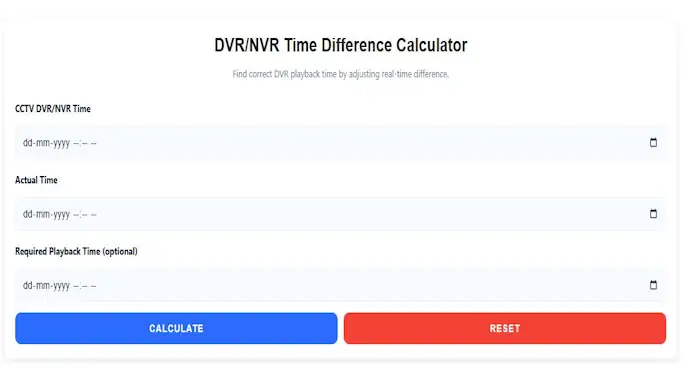
The calculator instantly determines the “delta”—the exact time difference—and applies it to your required playback time, giving you the precise timestamp to search for on your system.
📝 Practical Walkthrough: Finding a Stolen Package
Let’s use a real-world example to see how the CCTV Time Difference Calculator works in action.
A delivery driver’s log shows a package was dropped off at Yesterday, 2:30 PM (Actual Time). The homeowner reports it was stolen moments later. You go to the DVR to check the cameras.
- You notice the Current DVR Time is 10:00 AM.
- You check your phone, and the Actual Current Time is 10:45 AM.
The Problem: Your DVR is exactly 45 minutes behind real-time.
The Old Way (Mental Math): Trying to mentally adjust for the delay under pressure is confusing. “The event was at 2:30 PM. The clock is 45 minutes slow. Do I subtract or add? Is it 1:45 PM or 3:15 PM?” It is incredibly easy to make a mistake.
The New Way (With the Calculator):
- Input 1 (DVR Time): 10:00 AM
- Input 2 (Actual Time): 10:45 AM
- Input 3 (Incident Time): Yesterday, 2:30 PM
👉 Instant Result: The calculator instantly reports that the DVR is 45 minutes slow. To view the 2:30 PM event, you must open Yesterday, 1:45 PM on your DVR playback menu.
No guesswork. No frustration. Just the right clip, the first time.
✅ Key Benefits: More Than Just a Time-Saver
- Immediate Accuracy: Eliminates mental math and human error. Get the right timestamp in seconds, which is a critical necessity during a high-stress investigation.
- Avoid Missing Crucial Footage: The worst-case scenario is giving up, thinking the camera simply missed the event. This tool guarantees you are looking in the correct place, preventing you from overlooking vital evidence.
- Empowers All Users: You don’t need to be an IT expert. The intuitive design makes it easy for beginners, security staff, or homeowners to retrieve footage without calling for technical support.
- Universal Compatibility: It works seamlessly with any DVR, NVR, or hybrid system. If the internal clock is unsynchronized, this calculator will bridge the gap.
🎯 Who Can Use This Tool?
If you interact with a video surveillance system, this utility is indispensable:
- Business Owners & Home Users: Quickly locate CCTV footage of a slip-and-fall, a theft, or any incident without having to pay for a technician visit.
- Security Guards & Loss Prevention: Review events with speed and precision during your shift. Accurately log incidents and capture evidence without chronological confusion.
- CCTV Technicians & Installers: Use this as a rapid diagnostic tool on-site to demonstrate a time issue to a client. You can also use it to verify the effectiveness of a long-term fix after implementing an NTP server.
- Law Enforcement & Investigators: Ensure that the timestamps on your exported video evidence are correctly correlated with real-world time, thereby strengthening your case in court.
Don’t let time drift compromise your security operations. Bookmark the CCTV Time Difference Calculator today and turn chronological chaos into simple, actionable data.