File Size Converter: Accurately Convert KB, MB, GB, and TB
File Size Converter
Quickly convert digital storage units (KB, MB, GB, TB).
More Tools: Online Tools for CCTV Security Systems
In today’s data-driven world, managing digital files can feel like swimming in an alphabet soup of acronyms: KB, MB, GB, and TB. Whether you are a security professional managing massive CCTV video archives, an IT administrator handling daily server backups, or just someone trying to figure out if a video file will fit on a USB flash drive, understanding file sizes is absolutely critical.
Welcome to our free File Size Converter, a user-friendly utility designed to take the mental gymnastics out of computing. This tool instantly and accurately simplifies the conversion of digital storage units, ensuring you always know exactly how much space your data will consume.
Why File Size Conversion is Harder Than It Looks
At first glance, converting file sizes seems like simple math. However, the digital world operates on binary code (base-2 mathematics), which means digital storage doesn’t scale by neat, round thousands.
Instead of multiplying or dividing by 1,000, operating systems generally calculate storage capacity by factors of 1,024.
- 1 Megabyte (MB) = 1,024 Kilobytes (KB)
- 1 Gigabyte (GB) = 1,024 Megabytes (MB)
- 1 Terabyte (TB) = 1,024 Gigabytes (GB)
This creates a massive point of confusion. For example, if you have a folder containing 4,500 MB of security footage, your brain might quickly guess that it equals 4.5 GB. However, mathematically, 4,500 MB divided by 1,024 actually equals roughly 4.39 GB. While that difference might seem small for a single file, when you are dealing with Terabytes of CCTV data across an enterprise network, those missing gigabytes add up rapidly, leading to storage shortages and recording failures.
Our File Size Converter tool handles this precise 1,024-based division and multiplication for you, delivering 100% accurate results instantly.
How to Use the File Converter Tool
We designed this utility to be as clean, fast, and frictionless as possible. You do not need any technical expertise to get the answers you need. Just follow these simple steps:
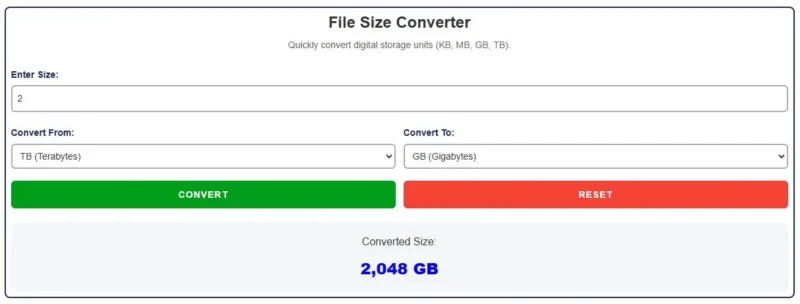
- Enter Size: Look at the file, folder, or hard drive you want to measure and input that numerical value into the “Enter Size” field.
- Convert From: Click the dropdown menu to choose the current unit of your entered size. You can select Kilobytes (KB), Megabytes (MB), Gigabytes (GB), or Terabytes (TB).
- Convert To: Select the specific unit you want to translate that number into.
- Click Convert: Press the green “Convert” button. The calculator will instantly process the binary math and display the exact converted file size on your screen.
- Reset: If you need to perform another calculation, simply hit the red “Reset” button to clear your workspace.
Crucial Use Cases: When Will You Need This Tool?
While anyone can use this tool, it was built specifically to solve daily headaches for professionals who manage heavy data loads. Here is how this tool saves time in the real world:
1. CCTV and Surveillance Storage Planning
Security cameras record continuously, generating massive video files. When an incident occurs, authorities may request footage spanning several hours or days. If your NVR exports a backup file that reads “8,500 MB,” you need to know exactly how large of a USB thumb drive to hand over to the police.
By plugging that number into our converter, you immediately see it equals about 8.3 GB, meaning a standard 8 GB flash drive will not be big enough, saving you from a frustrating transfer error.
2. Cloud Storage and Data Transfers
Uploading files to cloud servers (like Google Drive, AWS, or Dropbox) often comes with strict file size limits and bandwidth costs.
If a cloud service limits individual uploads to 5 GB, and your video editing project is 5,300 MB, you can use the calculator to verify whether your file exceeds the cloud provider’s limitations before you waste time attempting the upload.
3. Purchasing NVR and Server Hard Drives
When upgrading the hard drives in a DVR, NVR, or NAS (Network Attached Storage), you are dealing with Terabytes (TB) of space. If you know your system generates roughly 45,000 MB of video data every single day, converting that daily rate into Gigabytes and Terabytes is essential for calculating how many days of retention a new 8 TB hard drive will actually give you.
Advantages of Our Free File Size Converter
- Precision Accuracy: Uses standard binary mathematics (factors of 1,024) to ensure your conversions exactly match what your Windows or Mac operating system will read.
- Lightning Fast: Powered by lightweight browser scripts, you get instant results without waiting for web pages to reload.
- Responsive, Mobile-Friendly Design: Looks and works perfectly on your smartphone, allowing you to run calculations while standing in a server room or up on a ladder.
- 100% Free and Private: There is no software to install, no apps to download, and all calculations are performed locally on your device for total privacy.
Whether you are auditing your NVR’s storage capacities, planning overnight data transfers, or simply trying to free up space on your laptop, our File Converter tool is here to make the process efficient and hassle-free.
Try the calculator above and experience the convenience of quick, mathematically accurate file size conversions today!