CCTV cameras are one of the most important security tools in today’s world. Almost every shop, home, office, school, and commercial place now uses CCTV for protection. But buying cameras is only half the work. The real challenge starts when you need to install the system properly.
Some people hire professionals, while others prefer to do it themselves to save money and also to learn the process. If you have basic knowledge of networking and some tools, you can easily set up an IP CCTV system yourself.
In this article, I will explain in very simple step-by-step language how to install a CCTV IP camera system, what tools are required, professional tips, and how to solve common problems.
Choosing the Right CCTV IP Camera System
Before starting the installation, it is very important to select the right CCTV IP camera system that matches your security needs. A proper choice ensures better coverage, smooth functioning, and long-term reliability. Below are the main factors to consider:
- Coverage Area & Purpose: Decide how much area you want to cover – a small office, a shop, or a large outdoor space. Wide-angle dome cameras are good for indoor monitoring, while bullet cameras are ideal for covering long distances outdoors.
- Camera Type & Design: IP cameras come in different styles such as dome, bullet, turret, PTZ (Pan-Tilt-Zoom), and fisheye cameras. Each type has its advantages. For example, PTZ cameras allow remote movement and zoom, while dome cameras are discreet and less noticeable.
- Image Quality & Resolution: Higher resolution (like 4MP, 5MP, or 4K) provides clearer video and helps in identifying faces, license plates, and small details. For smaller areas, 2MP or 1080p may be sufficient, but for critical surveillance, higher resolution is recommended.
- Night Vision & Low-Light Performance: Ensure the camera has infrared (IR) night vision or starlight technology for clear footage even in low-light or complete darkness. This is very important for 24/7 surveillance.
- Indoor vs Outdoor Use: For outdoor cameras, always check the IP66/IP67 weatherproof rating and IK10 vandal-resistant rating to ensure durability against rain, dust, and tampering.
- Power Options (PoE vs. Non-PoE): PoE (Power over Ethernet) cameras use a single cable for both power and data, making installation cleaner and easier. Non-PoE cameras may require separate power adapters.
- Remote Viewing & Mobile Access: Look for cameras that support remote viewing via mobile apps or PC software. This allows you to monitor your property from anywhere using the internet.
- Storage & Recording Options: Decide whether you want to use an NVR (Network Video Recorder), cloud storage, or microSD cards. NVRs are best for multiple cameras, while cloud storage provides extra safety.
- Brand Reliability & Support: Always choose a trusted brand that provides good video quality, user-friendly software, reliable after-sales service, and future-proof features. Brands like Hikvision, Dahua, Uniview, and CP Plus are well-known in the market.
- Budget & Scalability: Your choice should fit within your budget but also allow room for future upgrades. For example, if you plan to add more cameras later, ensure your NVR supports expansion.
Read also: DIY Passive PoE – How to Manually Run 12V Power Over a LAN Cable
Required Equipment and Tools
To embark on your CCTV IP camera installation journey, gather the necessary equipment and tools. You’ll need cameras, cables, a network video recorder (NVR), power adapters, and tools such as drills and screwdrivers.
Main Equipment
- IP Cameras – Dome, bullet, or PTZ, depending on your need.
- NVR (Network Video Recorder) – For storing and managing video.
- Hard Disk Drive (HDD) – Installed inside the NVR to save footage.
- PoE Switch or PoE NVR – For power + data in one cable.
- Ethernet Cables (Cat5e/Cat6) – For camera connections.
- Router with Internet – Needed for remote access.
- Monitor or TV – To check live video and configure the system.
- Connectors – RJ45 connectors and I/O connectors are required for making cable connections between the camera, NVR, and PoE switch.
🔧 Tools for Installation and How They Help
- Ladder – To reach high walls or ceilings where cameras are fixed, especially when mounting outdoor or indoor dome cameras at height.
- Power drill – To make holes in walls for brackets, cable entry, and fixing cameras securely without damaging the wall structure.
- Drill bits (including masonry bits) – Different bits are used for drilling in concrete, brick, or wood, depending on the surface where cameras are installed.
- Electric heavy-duty screwdriver – To quickly tighten or loosen screws while mounting cameras or brackets, saving time compared to manual screwdrivers.
- Small screwdrivers – For opening camera covers, tightening DVR/NVR screws, and making small electronic connections safely during installation.
- Pencil and pen – To mark drilling points before making holes, ensuring accurate placement of camera brackets and cable entry spots.
- Hammer – To fix raw plugs into drilled holes and gently tap brackets or fittings into place for stable installation.
- RJ45 crimp tool – To attach connectors to network cables for IP cameras, ensuring proper internet connection and signal transmission.
- Cable stripper – To remove the outer jacket of wires safely without damaging the copper inside, which ensures smooth connections.
- Cutter & Stanley knife – To cut cables, trim insulation, or adjust wire length neatly during CCTV camera wiring work.
- Pliers – To bend, twist, or hold wires firmly, also useful for pulling out cables or tightening small metal parts.
- Safety goggles, helmet, boots – To protect eyes, head, and feet from dust, falling objects, or accidents while drilling or climbing ladders.
- Cable Rod Set & Fish Tapes – To pass cables through walls, ceilings, or tight hidden spaces where hands cannot reach easily.
- Electrical tape – To secure cables to rods, insulate exposed wire joints, and prevent electrical short-circuits during installation.
- Labels – To mark and identify cables clearly, which is very useful if multiple cameras and wires are running together.
- Raw plugs – To hold screws tightly inside walls, especially in concrete or brick, making the camera bracket firm and stable.
- Electrical meter – To check voltage and current, making sure the camera’s power supply is correct and safe before connecting.
- Video test monitor – To connect directly with the camera and adjust its viewing angle, focus, and picture clarity on the spot.
- Network test tool – To check if LAN cables and network connections are working properly, avoiding future camera connectivity issues.
Ensuring you have everything on hand will streamline the installation process.
How to Install a CCTV IP Camera System: Step-by-Step Guide
Here’s a practical installation guide that works for both small and large setups:
Step 1: Site Survey and Planning
- Draw a rough layout plan for cable routing and NVR placement. Walk through the location and mark entry points, exits, blind spots, parking, lobbies, cash counters, and storage rooms.
- Decide which type of camera suits each location. Example:
- Bullet cameras → perimeter and outdoor areas.
- Dome cameras → indoors.
- PTZ → open grounds or factories.
Step 2: Cabling
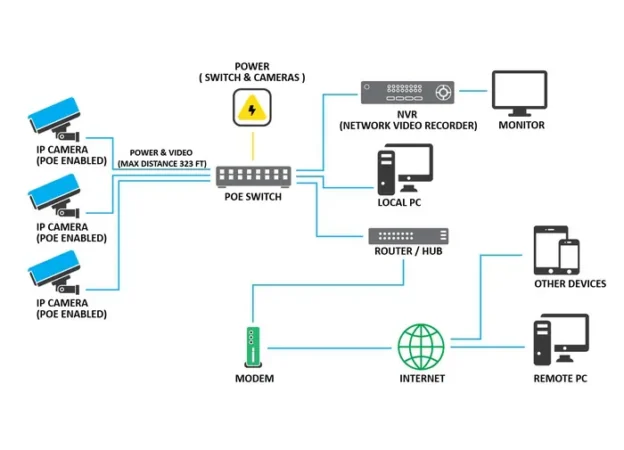
- Laying Cat5e or Cat6 cable → These cables are required for the CCTV IP Cameras system Installation. Carefully run and conceal cables to maintain a neat and professional appearance.
- If using PoE cameras → Run a single cable from each camera to the PoE switch/NVR.
- If not using PoE → Run a separate power cable + Ethernet.
- Label the cable → Label each cable to avoid confusion later.
Step 3: Mount the Cameras
- Use a drill and mounting kit to fix cameras at 8–12 feet height for optimum coverage.
- Avoid facing direct sunlight or strong light sources.
- Ensure the camera angle covers the maximum area without obstructions.
Step 4: Connect Cameras to NVR
- Insert the HDD into the NVR for storage.
- Plug each camera into the PoE switch or directly into the NVR PoE ports.
- Connect the NVR to the router using an Ethernet cable.
Step 5: Initial Configuration
- Power on the NVR and connect it to the monitor/TV.
- Assign IP addresses (manual or automatic DHCP).
- Add all cameras to the NVR channel list.
- Adjust time/date settings and recording modes (continuous, motion detection, schedule).
Step 6: Remote Access Setup
- Install the official mobile app (e.g., Hik-Connect, iDMSS, Guarding Vision).
- Scan the NVR QR code or manually input the serial number.
- Enable P2P (peer-to-peer) or port forwarding for internet viewing.
- Test remote access on mobile data (not Wi-Fi).
Step 7: Testing and Fine-Tuning
- Check each camera feed for clarity and angle.
- Adjust the IR night vision focus.
- Set alerts for motion, intrusion, or tampering if supported.
- Check recording playback to confirm the HDD works.
Professional Tips for IP CCTV Installation
- Always use Cat6 cables + quality RJ45 connectors to reduce packet loss.
- Use a PoE switch instead of separate adapters for cleaner wiring.
- For outdoor cameras, apply junction boxes and weatherproofing.
- Keep UPS backup for NVR and cameras to prevent downtime.
- Always change default login credentials for cybersecurity.
- Separate surveillance network VLAN for better performance in larger setups.
Common Problems and Troubleshooting the IP CCTV Camera System
- Camera not detected? → Check PoE power, cable, connectors, and IP address conflict.
- No video on NVR? → Verify stream type (main/sub) and network settings.
- Remote access not working? → Recheck P2P status or port forwarding on the router.
- Night vision blur? → Clean dome cover and check IR reflection.
- Storage full quickly? → Adjust resolution, FPS, and enable motion-based recording.
Cost of an IP CCTV System (2025 Estimate – India)
- IP Camera (2MP – 5MP): ₹2,500 – ₹7,000 per unit
- NVR (4 to 16 channels): ₹6,000 – ₹15,000
- HDD (2TB Surveillance Grade): ₹5,000 – ₹6,500. You can also use our “CCTV HDD Calculator” to know the estimated total required capacity of CCTV HDD.
- PoE Switch: ₹2,500 – ₹8,000 depending on ports
- Cables & Accessories: ₹20–25 per meter
- Professional Installation: ₹2,000 – ₹5,000 (optional)
👉 DIY installation can reduce costs significantly if you are comfortable with networking and tools.
Conclusion
An IP camera system is a reliable, high-quality, and future-proof security solution compared to analog CCTV. With features like remote viewing, HD/4K video, PoE cabling, and smart analytics, IP CCTV installations are becoming the standard for homes, offices, shops, and industries.
By following the step-by-step IP CCTV installation guide in this article, you can set up your own system or guide your technicians professionally. Whether you need just 2–4 cameras at home or a 32-camera industrial setup, the principle remains the same: Plan, Mount, Connect, Configure, and Test.
Investing in an IP CCTV system not only protects property but also provides peace of mind.
CCTV IP Camera FAQs
Can I install a CCTV IP system without professional help?
Yes, with the right tools and technical knowledge, you can install a CCTV IP system yourself. However, professional installation ensures optimal performance.
How often should I perform maintenance on my CCTV IP system?
Regular maintenance, including checks and inspections, should be performed at least once a quarter. Clean lenses and update software as needed.
What is the significance of compliance with surveillance regulations?
Compliance with regulations ensures legal operation and protects your privacy rights and those of others in the surveillance area.
Can I integrate my CCTV IP system with my smart home devices?
Yes, many CCTV IP systems are compatible with smart home devices, allowing for centralised control and monitoring.
Are CCTV IP systems vulnerable to hacking?
Implementing strong passwords, encryption, and regular software updates minimises the risk of hacking. Following security best practices enhances overall system security.