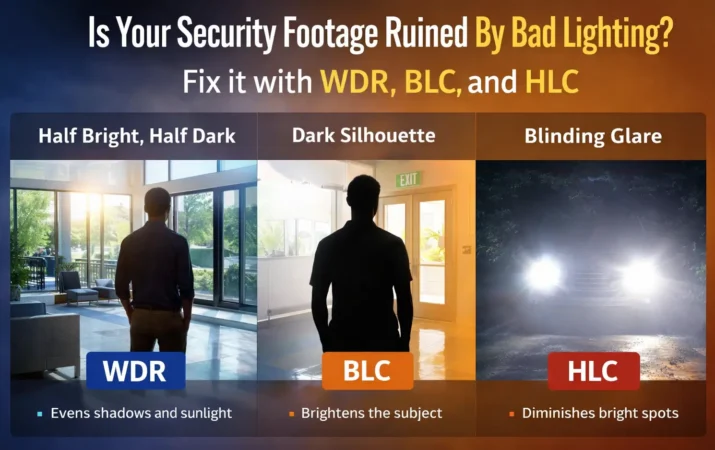
Ever checked your CCTV footage and only saw a dark shadow or strong light from car headlights? Poor lighting can spoil your video, even if your camera is costly.
To fix this, you will see settings like WDR, BLC, and HLC. Don’t worry—here is a clear and easy explanation of how these three features help improve your footage.
1. What is WDR in CCTV? (Wide Dynamic Range Explained)
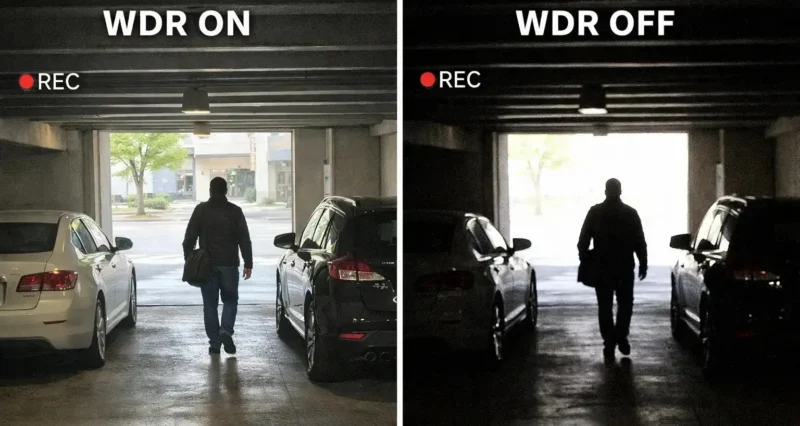
Human eyes can easily adjust when shifting from a dark room to a bright sunny window. But most cameras struggle—they either make indoor areas too dark or turn the bright window into a white blur.
WDR (Wide Dynamic Range) fixes this by balancing both bright and dark areas at the same time, so you get a clear and natural-looking image.
How WDR works:
A camera with True WDR captures two images in milliseconds—one for bright areas and one for dark areas—and combines them into a single, well-balanced frame.
When should you turn on WDR?
- Lobbies or entryways featuring massive glass doors.
- Loading docks where the inside is dark but the outside is sunny.
- Any room where bright sunlight floods in and creates heavy indoor shadows.
2. What is BLC in CCTV? Backlight Compensation Explained)
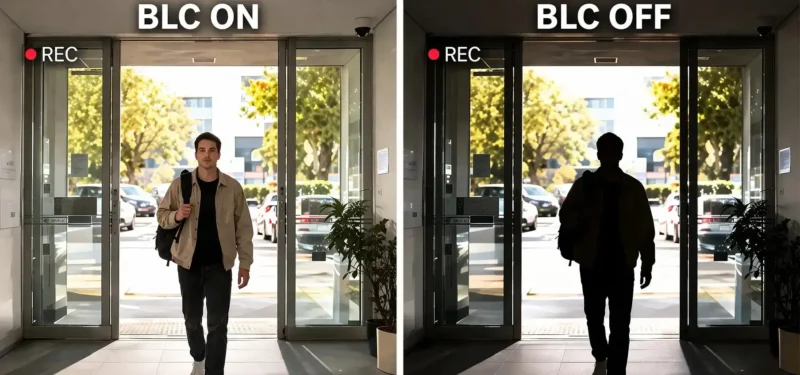
Have you ever tried taking a photo of a friend while the sun was setting directly behind them? Usually, your friend turns into a completely dark silhouette.
BLC (Backlight Compensation) is specifically designed to stop this silhouette effect. It basically tells the camera’s brain, “I do not care about the beautiful background; just make sure I can see the person in the front!”
How BLC works:
When a strong light is coming from behind your subject, BLC forces the camera to boost the brightness of the entire scene. The background will probably get washed out and look too white, but the person standing in the foreground will suddenly become fully visible. In security, seeing a face is always more important than seeing the scenery behind them.
When should you turn on BLC?
- Monitoring a dark hallway that ends at a brightly lit exit door.
- Looking at an entrance from the inside out.
- When you specifically need to identify a person standing in front of a strong light source.
3. What is HLC in CCTV? (Highlight Compensation Explained)
While WDR and BLC help you see into the shadows, HLC (Highlight Compensation) deals with the opposite problem: things that are painfully bright.
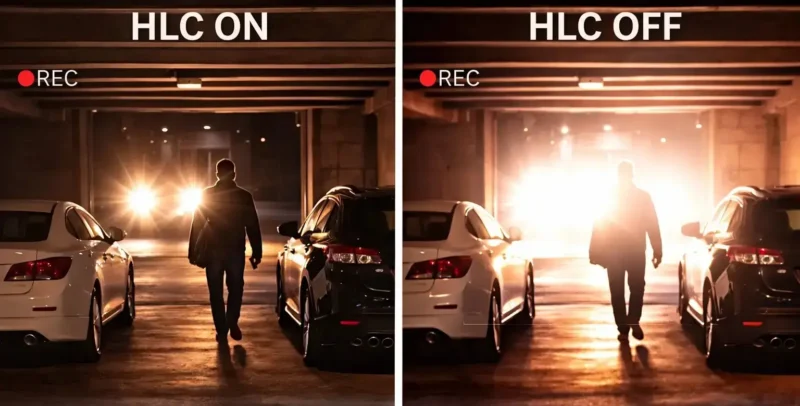
Think of HLC as a pair of digital sunglasses for your security lens. Sudden, intense bursts of light—like a car hitting its high beams at night—will instantly blind a normal camera sensor, causing massive glare that hides everything around it.
How HLC works:
When the camera detects a blinding spot of light, HLC automatically slaps a dark, digital patch directly over the glare. By dimming just the most intense spots, the camera prevents the glare from spilling over the rest of the image.
When should you turn on HLC?
- Reading license plates on vehicles at night.
- Driveways, streets, or parking garages where car headlights constantly point at the camera.
- Alleyways that have harsh, intense floodlights.
Read also: Can CCTV Cameras See in the Dark?
How to Enable WDR, BLC, and HLC in CP Plus IP Camera
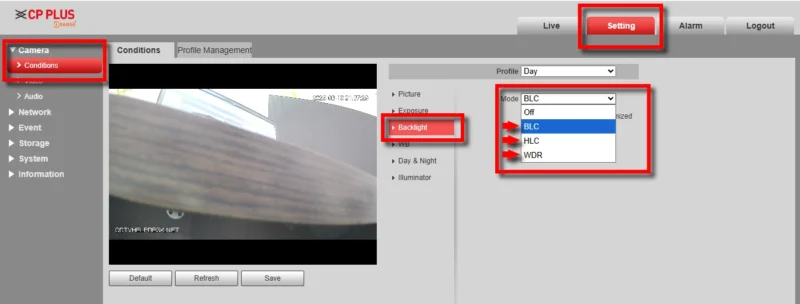
- First, login to your CP Plus IP camera using a web browser.
- Go to the Setting option from the top menu.
- Click on Camera from the left side.
- Then click on Conditions.
- Select Backlight from the available options.
- Now you will see different modes: WDR, BLC, and HLC.
- Choose any one option based on your requirement and click Save.
How to Enable WDR, BLC, and HLC in Hikvision IP Camera
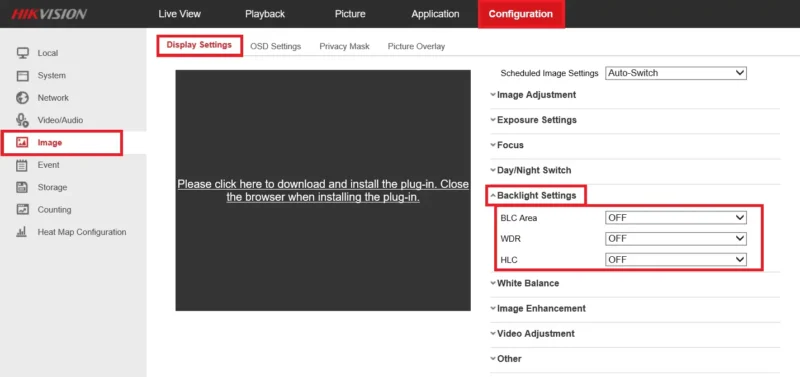
- First, login to your Hikvision IP camera using a web browser.
- Click on the Configuration tab from the top menu.
- From the left side, click on Image.
- Open Display Settings.
- Scroll down and find Backlight Settings.
- Here you will see options like WDR, BLC, and HLC.
- Enable or adjust any option as per your requirement.
- Click Save to apply the settings.
WDR vs BLC vs HLC – Quick Reference Summary
Still trying to remember which setting to click? Use this simple cheat sheet to match your problem with the right solution:
| The Lighting Problem | The Setting You Need | What It Does |
| Half bright, half dark | WDR | Evens out the whole picture so you can see shadows and sunlight simultaneously. |
| Subject is a dark silhouette | BLC | Sacrifices the background to brighten up the person in the front. |
| Blinding glare in the dark | HLC | Blocks out intense lights (like headlights) so you can see what’s behind the glare. |
Read Also: CCTV Encode Settings: Resolution, Bitrate & FPS
Final Conclusion
Getting crisp, clear security cctv footage is rarely about buying the most expensive gear; it is almost always about managing your light.
By understanding how WDR, BLC, and HLC function, you can tweak your system to perfectly match its environment.
Don’t be afraid to test these settings out at different times of the day to see which one gives you the clearest picture!