If you are planning to install CCTV cameras, upgrading an existing system, or just researching security equipment, you will inevitably come across the term ONVIF. It is one of the most important concepts in modern video surveillance because it dictates how different security devices talk to each other.
Let’s break down everything you need to know about ONVIF in a very simple, easy-to-understand way.
What is ONVIF in CCTV?
ONVIF stands for Open Network Video Interface Forum.
Founded in 2008 by three major security industry players—Axis Communications, Bosch Security Systems, and Sony—it is a global, open industry standard. Its main goal is to allow IP-based security products (like cameras, video recorders, and software) from completely different brands to communicate with each other seamlessly over a network.
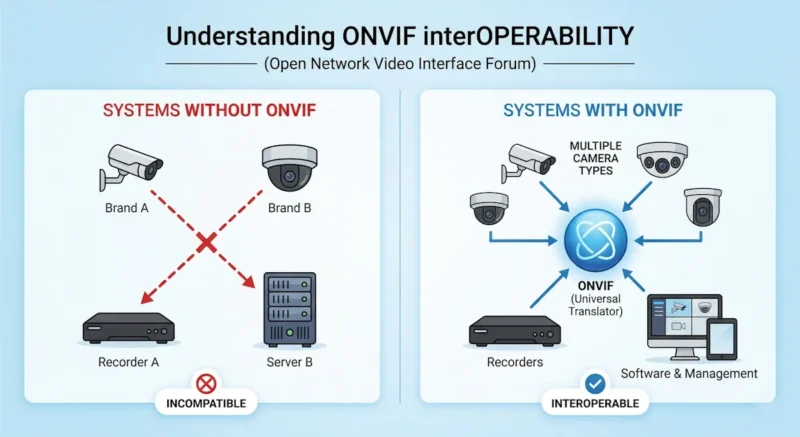
In simple words: ONVIF acts as a universal translator. It ensures that an English-speaking camera can perfectly understand a Spanish-speaking recorder, meaning different company devices can work together without a problem.
Why ONVIF is Extremely Important
Before ONVIF was created, the CCTV industry had a massive problem: Vendor Lock-in.
Before ONVIF:
- Each manufacturer used its own secret, proprietary software language.
- Cameras from Brand A only worked with recorders (NVRs) from Brand A.
- If you wanted to add a specific camera from Brand B to your system because it had better features, you couldn’t.
- Mixing brands was either technically impossible or required expensive, custom-built software.
With ONVIF:
- Devices use a shared, standard language.
- You can easily mix and match different brands on the same network.
- Installation and system design become incredibly flexible.
- You are no longer trapped into buying from just one company for the rest of your life.
A Practical Example
Suppose you have an NVR (Network Video Recorder) from Dahua, but you find a great deal on a PTZ (Pan-Tilt-Zoom) camera from Hikvision.
- If both support ONVIF: You simply plug the Hikvision camera into your network, the Dahua NVR finds it, and they work together easily to record video.
- Without ONVIF: The NVR would likely fail to recognize the camera, leaving you with a blank screen and wasted money.
Main Features: What Does ONVIF Actually Do?
When two devices connect via ONVIF, the standard handles several specific tasks behind the scenes:
- Device Discovery: The system can automatically search and find new cameras on your local network (using a protocol called WS-Discovery). You don’t always have to type in IP addresses manually.
- Video Streaming: It ensures the video feed is sent in a standard format so any ONVIF-supported software or monitor can display the live video perfectly.
- Audio Streaming: If your camera has a microphone or two-way audio, ONVIF allows the sound to be transmitted alongside the video.
- PTZ Control: If you have a camera that can Pan, Tilt, or Zoom, ONVIF allows the recorder or joystick to control those physical movements.
- Alarm & Event Handling: If your camera detects motion or a tampered lens, ONVIF ensures that alert is successfully sent to the recorder or your mobile app.
ONVIF Profiles Explained (Crucial to Know)
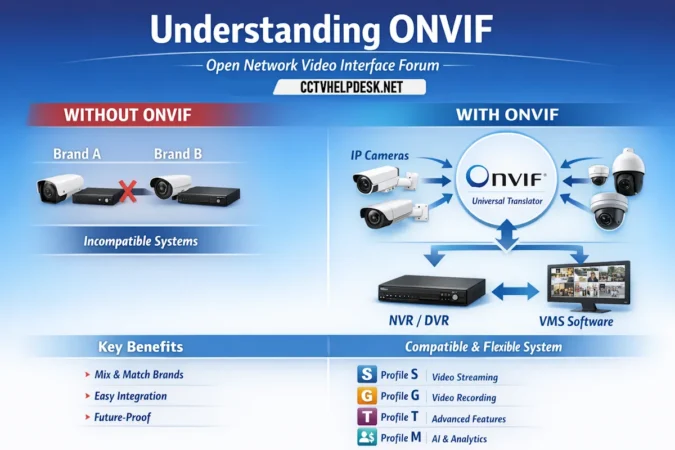
ONVIF isn’t just one single feature; it is divided into different “Profiles.” Each profile acts as a specific checklist of features. Just because a camera is “ONVIF compatible” doesn’t mean it supports everything. You must check which profile it uses.
Here are the most important profiles you will encounter:
- Profile S (The Most Common): Designed for IP video systems. It guarantees basic live video streaming, audio streaming, and basic PTZ controls. If a camera is ONVIF, it almost certainly has Profile S.
- Profile G: Designed for video storage. This handles recording, searching, and playing back video files from an NVR, DVR, or an SD card inside the camera.
- Profile T: The modern upgrade to Profile S. It supports advanced video compression (like H.265, which saves hard drive space), advanced motion detection, and better image settings.
- Profile M: The newest profile, built for the AI era. It standardizes metadata and analytics. If your camera has smart AI (like human/vehicle detection or facial recognition), Profile M allows it to send that smart data to a different brand’s recorder.
- (Bonus) Profiles A & C: These are used for electronic access control (doors, keycards, and gates) rather than video.
Advantages and Limitations of ONVIF
While ONVIF is a lifesaver, it is not absolutely perfect. It helps to know the pros and cons.
✔️ The Advantages
- Ultimate Flexibility: Build a custom system using the best cameras from different brands.
- Future-Proofing: Easy to upgrade parts of your system years down the line without replacing everything.
- Cost-Effective: You can shop around for the best deals instead of buying overpriced cameras just to match your current NVR brand.
- Better Scalability: Ideal for massive commercial setups like schools or hospitals that expand over time.
❌ The Limitations
- Advanced Features Often Fail: Basic functions (like live video and recording) work flawlessly across brands. However, brand-specific special features (like a unique AI tracking mode, specialized alarm lights, or proprietary thermal reading) might not transfer over ONVIF.
- Configuration Hurdles: Sometimes it’s not strictly “plug-and-play.” You might need to log into the camera’s web interface to manually turn ONVIF on or create an ONVIF user account.
- Version Mismatches: If you have a very old ONVIF camera and a brand new NVR, they might struggle to communicate perfectly due to outdated firmware.
Pro Tip: How to Properly Check for ONVIF Support
Before spending your money on a CCTV device, do not just take the seller’s word for it. Here is how you verify:
- Check the Spec Sheet: Look for the ONVIF logo or the words “ONVIF Supported” in the product specifications.
- Look for the Profile: Ensure it specifically mentions the profile you need (e.g., “ONVIF Profile S/G/T”).
- The Official Database: The safest way to check is to go to the official ONVIF website (onvif.org) and search their “Conformant Products” database. If the camera is listed there, it is officially certified. (Beware of cheap, no-name cameras that claim to be ONVIF but actually use hacked, unofficial firmware).
Common ONVIF Troubleshooting Tips
If you are trying to connect two ONVIF devices and they aren’t working, check these three things:
- Is ONVIF Enabled? Many modern cameras (like Hikvision) ship with ONVIF disabled by default for cybersecurity reasons. You have to log into the camera and tick a box to turn it on.
- ONVIF User Setup: You usually have to create a specific “ONVIF Admin User” with a password inside the camera’s settings before the NVR can access it.
- Time Sync (NTP): ONVIF requires the camera and the NVR to have the exact same time and date. If your camera thinks it is 2020 and your NVR knows it is 2024, the ONVIF connection will fail.
Final Conclusion
ONVIF is arguably the most useful standard in the CCTV industry. It breaks down the walls between competing companies and gives you the freedom to choose the exact cameras and recorders you want, regardless of the brand logo stamped on the front.
👉 The Golden Rule: If you want a smart, flexible, and future-proof CCTV setup, always prioritize devices that are officially ONVIF-supported. It will save you time, money, and a massive headache down the road.