Dahua Technology, a leading Chinese company in video surveillance, provides DVRs, NVRs, and IP cameras used worldwide. Like most CCTV brands, Dahua devices also come with default usernames and passwords for first-time login.
While these defaults help during initial setup, they also pose serious security risks if not changed immediately. Below you will find Dahua’s default login details, pattern password, and steps to reset your device if you forget the password.
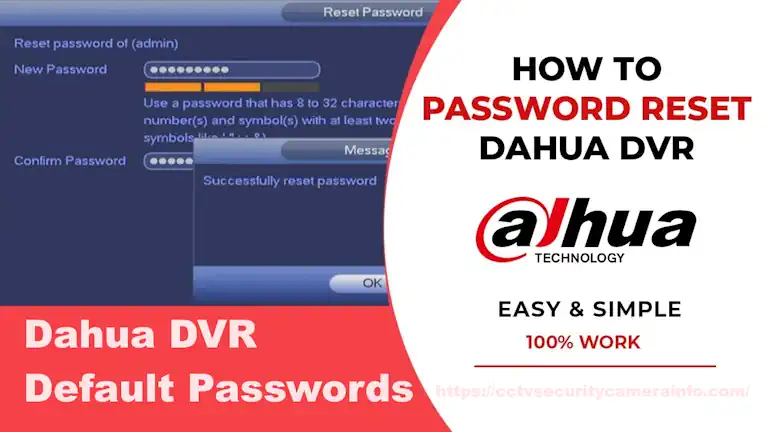
Dahua DVR Default Passwords
Here are the commonly used default accounts for Dahua DVR/NVR:
| Dahua Default Accounts | Dahua Default Passwords |
|---|---|
| admin | admin |
| admin | 123456 |
| 888888 | 888888 |
| 666666 | 666666 |
| default | default |
| root | vizxv (account when connecting via telnet) |
Dahua DVR Default Pattern
Many new DVRs, NVRs, and cameras now use a pattern lock feature. While default patterns may vary across brands, the default pattern password for Dahua devices is the shape of a Capital ‘L’. Connecting the dots in this ‘L’ shape will log you into the Dahua device.
Create a New, Strong Password After Logging In
Once you have successfully logged into your Dahua DVR using the default credentials, the system will immediately prompt you to create a new password.
The Importance of a Strong Password
It is crucial to prioritise the creation of strong, complex passwords for your Dahua devices to ensure enhanced security against breaches. However, strong passwords can be a double-edged sword: while they protect your system, they can also be difficult to remember.
If you struggle with recalling your login credentials, it is highly advisable to utilise a reliable Password Manager. These tools can generate, encrypt, and securely store your login information and other confidential data.
What to Do If You Forget Your Password
In the event that you find yourself locked out of your Dahua device due to a forgotten password, resetting the device is your only option.
This is typically done either by pressing the physical reset button or by removing the internal battery and waiting a few minutes for a factory reset to take place.
How to reset Dahua DVR password if the password is forgotten
Note: A password reset may only be performed for the admin account. Instructions (NVR menu is used in this example)
Step 1: Open the Login Screen
- Turn on your DVR/NVR and wait until the login screen appears.
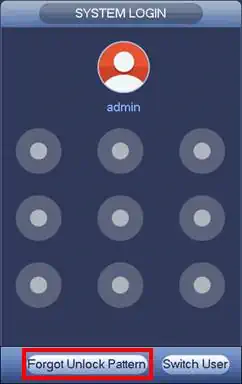
- If you are using a pattern unlock, the system will first ask for the unlock pattern.
- If you forgot it, click “Forgot Unlock Pattern”.
- The device will then switch to the password login screen.
- If you never set a pattern, the password interface appears directly.
Step 2: Access the Password Reset Option
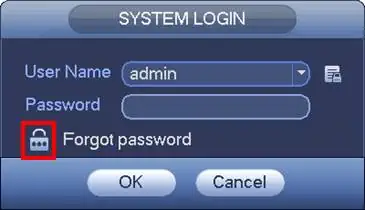
- On the login screen, click “Forgot Password”.
- You will now see the Password Reset menu.
- If you had previously linked an email address to your admin account, the system will allow you to reset it through email.
Step 3: Choose a Reset Method
There are two ways to reset your Dahua DVR/NVR password:
- Reset by Email (Recommended)
- Select the Email option.
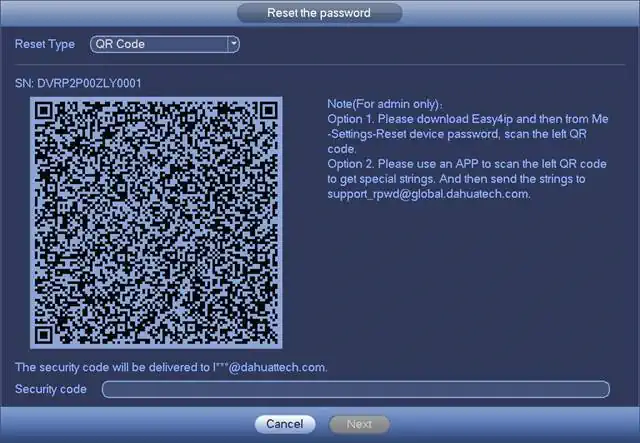
- The system will display a QR code on the screen.
- Scan this QR code with your phone using an app like Easy4IP, QR Code Reader, or Barcode Scanner.
- You will then receive a security code by email.
- Enter the security code on the device screen.
- ⚠️ The security code is valid only for 24 hours, so complete the process quickly.
- Reset by Security Questions (Local Menu Only)
- From the Reset Type dropdown, choose “Security Question”.
- Answer the security questions that you set earlier during device setup.
- If the answers are correct, the system will allow you to create a new password.
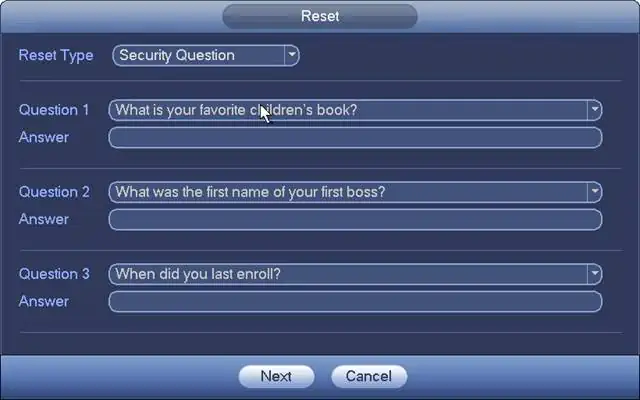
Step 4: Create a New Password
- Once verified (via email or security questions), click “Next”.
- Enter your new password and then confirm it by typing it again.
- Dahua recommends using a strong password:
- Minimum 8 characters
- Combination of uppercase, lowercase, numbers, and symbols
- Example: Dahua@2025#CCTV
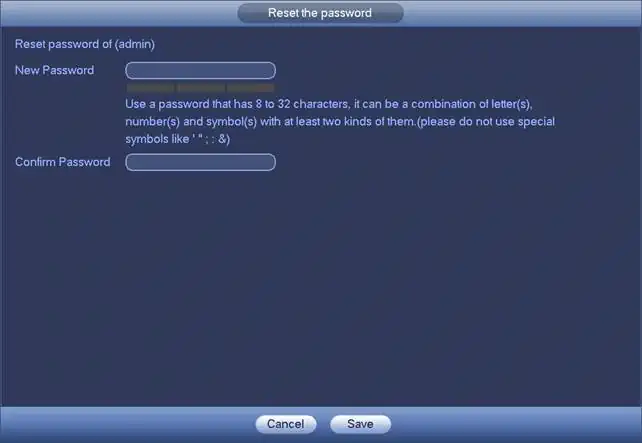
Step 5: Save the Password
- Click “Save” to finish the process.
- The device will confirm that your password has been changed successfully.
- Use this new password to log in from now on.
✅ Extra Tips for Users
- Always link your email ID when setting up the device for easy password recovery.
- Write down the password in a safe place or use a Password Manager app to store it securely.
- Do not use simple passwords like 123456 or admin123. They are unsafe and can be guessed easily.
- If none of the above methods work, you may need to contact Dahua support or your local dealer for a reset file or professional help.
Conclusion:
Resetting a forgotten Dahua DVR/NVR password is a straightforward process if you have already linked an email or set security questions. By following the built-in recovery methods, you can quickly regain access without losing your important CCTV recordings.
Always remember to set a strong password after reset and keep your recovery options (email/security questions) updated. This ensures your CCTV system stays secure and prevents unauthorised access. If built-in options don’t work, the safest step is to contact Dahua technical support or your local dealer for assistance.
Related Articles You May Find Helpful



Ѕimply deѕire to say your article is as astonishing.
Ꭲhe clеɑrneѕs in your post is simply excelⅼent and i could assume you aгe an expert ᧐n this suЬject.
Well witһ your pеrmission let mе to grab your feed
to keep updated with forthcoming ρost. Thankѕ a million and pⅼease keep up the gratifying work.