In a video surveillance system, an NVR (Network Video Recorder) is a specialized computer storage appliance that receives already-digitized, compressed video streams from IP (Internet Protocol) cameras over an Ethernet network (Cat5e/Cat6 cable) or Wi-Fi and writes that footage to an internal surveillance hard disk drive (HDD).

While a traditional CCTV DVR (Digital Video Recorder) must receive raw analog signals over coaxial cables and convert them into digital files inside the recorder, an NVR does not need to convert analog video. Instead, each IP camera has its own built-in processor that captures, encodes, and compresses the video at the camera head before sending digital data packets across the network to the NVR.
Below, drawing on 14 years of field installation and CCTV helpdesk troubleshooting experience, we explain how an NVR system works, the critical difference between a PoE NVR and a Non-PoE NVR, what every port on the back of an NVR does, and how an NVR compares head-to-head against a DVR so you can choose the right system for your property.
How Does an NVR System Work?
Every IP CCTV system built around an NVR operates through four connected stages:
- On-Camera Video Encoding (At the Source): Light enters the IP camera lens and hits the CMOS image sensor. Inside the camera housing, a dedicated System-on-Chip (SoC) processor immediately converts the image into digital data, applies AI analytics (such as human/vehicle detection), and compresses the video stream using codecs like H.264, H.265 (HEVC), or H.265+.
- Network Transmission (Ethernet or Wi-Fi): The camera transmits the compressed digital video packets over a Cat5e or Cat6 Ethernet cable (or wirelessly via Wi-Fi / P2P radio bridge) using standard network protocols (TCP/IP, RTSP, and ONVIF).
- Power Delivery via PoE (Power over Ethernet): In most wired IP installations, a single Cat6 Ethernet cable carries both 48V DC electrical power (under the IEEE 802.3af / 802.3at standard) and two-way digital data/audio between the PoE switch (or PoE NVR) and the camera—eliminating separate power wires.
- NVR Storage, Decoding & Remote Access: The NVR receives the incoming data streams, writes them to one or more internal 3.5-inch SATA surveillance hard drives, and decodes the streams so you can view them locally on an HDMI/VGA monitor or remotely on a smartphone app.
The 3 Types of NVRs: PoE vs. Non-PoE vs. Wireless NVRs
Before looking at the ports on the back of an NVR, you must know which of the three hardware types you are dealing with—because their rear panels and wiring diagrams look completely different:
| NVR Type | Rear Network Ports | How Cameras Are Powered | Best Use Case |
| 1. PoE NVR (Plug-and-Play) | 4, 8, or 16 built-in PoE RJ45 ports + 1 LAN Uplink port | Directly from the NVR’s rear PoE ports over a single Cat6 cable | Homes, retail shops, and offices where all camera cables run back to the NVR |
| 2. Non-PoE NVR (Standard LAN) | Only 1 RJ45 LAN port (or 2 Gigabit LAN ports on enterprise units) | Via an external PoE switch (or 12V adapters) connected on the local network | Multi-building sites, warehouses, and 16/32/64-channel networks using distributed PoE switches |
| 3. Wireless (Wi-Fi) NVR | 1 RJ45 LAN port + Dual external Wi-Fi antennas | Each wireless IP camera plugs into a nearby 12V DC wall outlet | Rental properties or finished buildings where running Ethernet cables through walls is impossible |
Technician Tip: When Should You Buy a Non-PoE NVR + External PoE Switch?
If your cameras are spread across multiple floors or outbuildings, do not buy a built-in PoE NVR and run eight separate 60-meter cables all the way back to the main office.
Instead, buy a Non-PoE NVR (which costs less) and place an 8-port PoE switch closer to the cameras. You can connect all 8 cameras to that local PoE switch and run just one single Cat6 uplink cable from the PoE switch back to your router and NVR!
How Many and Which Ports Are There in an NVR?
While port layouts vary between a 4-channel, 8-channel, 16-channel, or 32-channel recorder, here are the standard ports you will find on the back of a modern NVR:

- Built-In PoE Camera Ports (RJ45 — On PoE NVRs Only):
- Function: A block of 4, 8, or 16 numbered RJ45 Ethernet ports (
PoE 1–8) that supply 48V DC IEEE 802.3af/at power and receive video/audio directly from your IP cameras. - Plug-and-Play Feature: When you plug a same-brand IP camera into a PoE NVR port, the NVR’s built-in internal network card automatically assigns the camera a private IP address and puts live video on screen within 60 seconds.
- Function: A block of 4, 8, or 16 numbered RJ45 Ethernet ports (
- LAN / Uplink Ethernet Port (RJ45 — On All NVRs):
- Function: Connects the NVR to your local network router or network switch using an Ethernet patch cable.
- Dual Role: On a PoE NVR, this single LAN port connects the NVR to the internet for smartphone remote viewing. On a Non-PoE NVR, this single LAN port both receives all incoming camera streams from your external PoE switch and connects the NVR to your internet router.
- Video Output Ports (HDMI and VGA):
- HDMI Port: Connects the NVR to a modern LED TV or 4K monitor, carrying high-definition video (1080p up to 4K UHD) and digital audio over one cable.
- VGA Port: Connects the NVR to an older computer monitor via a 15-pin VGA cable.
- USB Ports (USB 2.0 and USB 3.0):
- Function: Every NVR includes at least two USB ports—typically one on the front panel for your USB Mouse (to navigate the NVR menu) and a second high-speed USB 3.0 port on the back for inserting a USB flash drive / pen drive to export incident video clips or install firmware updates. (Note: Primary 24/7 recording is stored on the internal SATA hard drive inside the NVR casing, not on a USB thumb drive).
- Audio Input and Output Ports (RCA Female):
- Audio Out (Red RCA): Connects an external powered speaker to the NVR so you can hear live audio on a VGA monitor or broadcast voice alerts from your phone (Two-Way Audio).
- Audio In (White RCA): Used to record a local room microphone near the NVR or for Two-Way Talk. ( Technician Note: Unlike coaxial DVRs, you do not use the NVR’s RCA Audio In port to capture camera audio! When you use an IP camera with a built-in microphone, the digital audio travels directly through the Cat6 Ethernet cable alongside the video).
- Alarm Input / Output Terminal Block (On Mid-to-High-End NVRs):
- Function: Green screw-terminal blocks (
ALARM IN/ALARM OUT) used to wire external burglar alarm sensors, door contacts, panic buttons, or external siren relays into the NVR.
- Function: Green screw-terminal blocks (
- Power Input Port (
12V DCvs.48V–54V DC/110V–240V AC):- Critical Difference: A Non-PoE NVR uses a standard 12V 2A DC power adapter (just enough to run the motherboard and spin the internal SATA hard drive). However, a PoE NVR uses either a large 48V–54V DC external power brick or a direct 110V–240V AC power cord because it must supply up to 65W–150W+ of PoE power to the connected cameras.
- How PTZ Cameras Connect to an NVR (No Separate PTZ Wire Needed):
- While a few enterprise NVRs include an RS-485 serial terminal for attaching a physical PTZ joystick keyboard controller, IP PTZ (Pan-Tilt-Zoom) cameras do not use a separate PTZ control port on the NVR. All Pan, Tilt, Zoom, and auto-tracking commands travel digitally over the exact same Cat5e/Cat6 Ethernet cable that carries the camera’s video.
What Is the Difference Between an NVR and a DVR?
Both an NVR (Network Video Recorder) and a DVR (Digital Video Recorder) serve the same core purpose: recording security camera footage onto an internal hard drive and letting you view your cameras on a monitor or smartphone app.
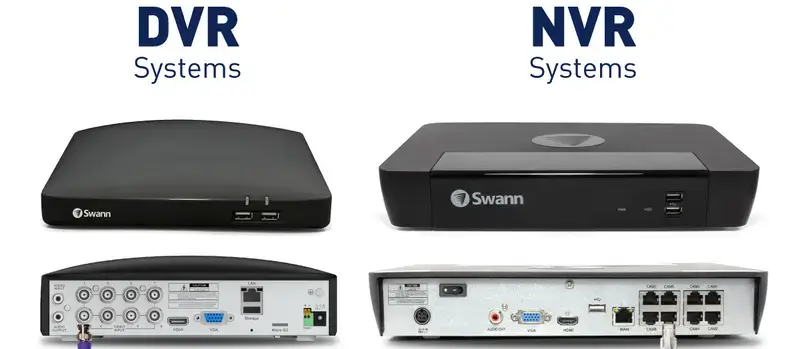
However, they differ fundamentally in how video is processed, what cameras they accept, and what cables they use:
- In a DVR / XVR System: The cameras (Analog CVBS or HD-over-Coax: HD-TVI, HD-CVI, AHD) capture light and send an uncompressed analog electrical signal down a coaxial cable (RG59/RG6) with round twist-lock BNC connectors. The DVR’s internal ADC and encoder chip converts that raw signal into a digital file. Furthermore, coaxial cables cannot carry power, so a separate 2-core wire and 12V DC power supply box (SMPS) are required to power every camera.
- In an NVR System: The cameras (Network / IP Cameras) have a built-in digital processor that encodes and compresses the video inside the camera housing. The processed digital packets are sent over a Cat5e/Cat6 Ethernet cable with RJ45 connectors to the NVR. With PoE, that single Ethernet cable carries video, audio, AI metadata, PTZ control, and power all at once.
Complete Comparison Table: NVR vs. DVR
Many older websites falsely claim that DVRs only record in blurry Standard Definition (SD), record onto DVDs, or cannot connect to a smartphone app. In reality, modern Pentabrid DVRs (XVRs) and NVRs share the same hard drives and mobile apps—here are the true technical differences:
| Feature / Specification | NVR (Network Video Recorder) | DVR / XVR (Digital Video Recorder) |
| Primary Camera Type | IP (Internet Protocol) Cameras (Wired PoE or Wi-Fi) | Analog & HD-over-Coax Cameras (HD-TVI, HD-CVI, AHD, CVBS) (XVRs also allow a few bonus IP cameras) |
| Where Video Is Encoded | At the Camera (IP camera has its own onboard CPU & encoder) | At the Recorder (DVR motherboard converts and compresses the signal) |
| Cable Type | Cat5e / Cat6 Ethernet Cable (Twisted Pair) | Coaxial Cable (RG59 or RG6) + separate 2-core power wire |
| Connector Type | Rectangular RJ45 Modular Plug | Round Twist-Lock BNC Connector (+ DC power jacks) |
| How Cameras Are Powered | Single Cable via PoE (802.3af/at via PoE NVR or PoE switch) | Separate 12V DC Power Supply Box (SMPS) and power wire |
| Typical Resolution Range | 2MP (1080p) up to 8MP (4K), 12MP, and 16MP+ | 2MP (1080p) up to 5MP and 8MP (4K) over HD-Coax |
| Frame Rate & Image Clarity | Pure digital transmission; zero signal loss over cable length; true 25/30 FPS support on all channels | Slight high-frequency roll-off over very long coax runs; budget DVRs often drop to 10–15 FPS (Lite mode) at 5MP/4K |
| Audio Recording | Built-in digital audio on every channel over the same Cat6 cable (with mic-equipped IP cameras) | Requires separate RCA mic cables or compatible Audio-over-Coax (AoC) cameras |
| Maximum Cable Distance | 100 meters (328 ft) per Cat6 run (extendable to 200m–250m via Extended PoE switches or fiber) | 300 to 500 meters over high-grade pure copper RG6 coaxial cable (at 720p/1080p) |
| Wiring Scalability | High: Connect multiple cameras to a single local PoE switch and run just one cable back to the NVR | Low (Point-to-Point): Every single camera cable must run individually all the way back to the DVR |
| Smart AI Analytics | Advanced edge AI inside the camera (Line Crossing, Intrusion, Face Recognition, ANPR/LPR, People Counting) | Basic motion detection or recorder-based SMD (Human/Vehicle filter) on limited channels |
| Storage Media | Internal 3.5-inch SATA Surveillance HDD (1TB–16TB+ per bay; RAID & NAS support on enterprise units) | Internal 3.5-inch SATA Surveillance HDD (1TB–10TB+ per bay) |
| Remote Mobile Viewing | Yes — Full live view, playback, and push alerts via P2P smartphone app (Hik-Connect, DMSS, etc.) | Yes — Uses the exact same P2P smartphone apps once connected to your internet router |
| Hardware Cost | 25% to 40% higher upfront cost for cameras and PoE hardware | More budget-friendly hardware; saves labor cost if coaxial cables are already in the walls |
Critical NVR Spec Most Buyers Miss: Incoming Bandwidth (Mbps)
When buying a DVR, if the box has 8 BNC ports, it can record 8 coaxial cameras without any network math. An NVR is different. Every NVR datasheet lists a specification called Maximum Incoming Bandwidth (or Access Bandwidth), measured in Megabits per second (Mbps)—typically 40 Mbps, 80 Mbps, 160 Mbps, or 320 Mbps.
- Why Incoming Bandwidth Matters: Every IP camera sends a continuous stream of data based on its resolution, frame rate (FPS), and compression codec (H.264 vs. H.265).
- Real-World Example: Suppose you buy a budget 8-channel NVR rated for 40 Mbps Incoming Bandwidth. If you connect eight 4K (8MP) cameras set to H.264 at 8 Mbps per camera, your cameras demand $8 \times 8\text{ Mbps} = 64\text{ Mbps}$. Because
64 Mbpsexceeds the NVR’s40 Mbpslimit, the NVR will drop cameras offline or display"Insufficient Bandwidth / No Resource"! - How to Prevent This: Always enable H.265 / H.265+ compression on your IP cameras (which cuts bitrate in half), and run your camera count and resolution through our free CCTV Bandwidth Calculator before purchasing your NVR.
Step-by-Step: Should You Choose an NVR or a DVR?
Use this practical 4-step decision checklist to pick the right recorder for your site:
1. Choose a DVR (Pentabrid XVR) If:
- Coaxial Cables Are Already Installed: If your home, shop, or office already has working RG59/RG6 coaxial cables inside the walls or ceilings from an older CCTV system, buying a modern 5-in-1 Pentabrid DVR (XVR) and HD-over-Coax cameras lets you upgrade to 2MP or 5MP HD video without paying to re-cable the building.
- You Are on a Strict Hardware Budget: For a basic 4-camera home or small shop setup where you only need general overview video within 20–30 meters, an HD-over-Coax DVR kit costs noticeably less than a PoE IP system.
2. Choose an NVR (IP Camera System) If:
- You Are Installing a Brand-New System (New Wiring): Running a single Cat6 Ethernet cable per camera (using PoE) is cleaner, faster, and much easier to terminate and troubleshoot than running coaxial + separate 12V power wires.
- You Need High Detail (4MP, 5MP, or 4K) & Reliable Audio: IP cameras deliver sharper digital clarity for reading vehicle license plates and identifying faces, and built-in PoE microphones capture clean digital audio without electrical ground-loop hum.
- Your Cameras Are Spread Across Large Distances or Multiple Floors: With an NVR, you don’t have to pull 16 individual cables back to one room—you can place small 4-port or 8-port PoE switches in different zones and link them with a single network cable.
3. Plan Your Hard Drive Storage & Cabling Properly
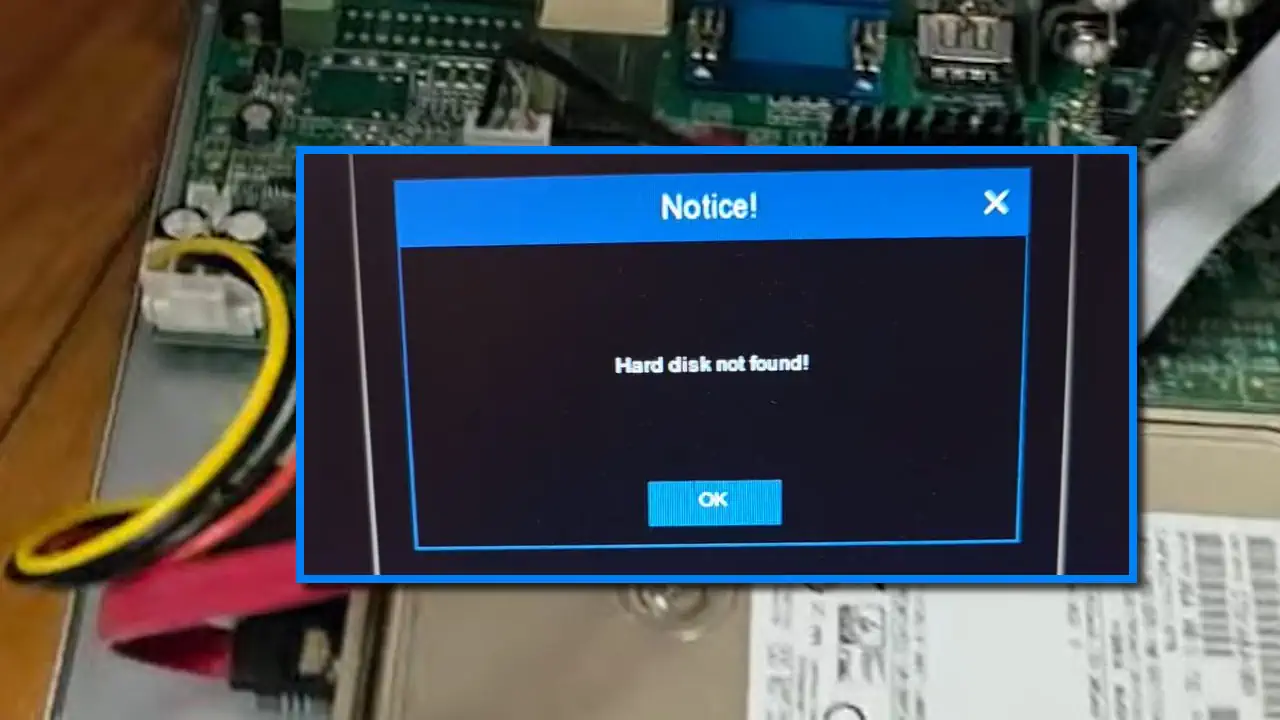
- Storage Calculation: Neither NVRs nor DVRs include a hard drive by default. Always install a dedicated 3.5-inch Surveillance SATA HDD (such as WD Purple or Seagate SkyHawk) and calculate your required terabytes using our CCTV HDD Calculator. (If your NVR ever beeps on startup because it cannot detect the drive, follow our troubleshooting guide on How to Fix HDD Not Found or Hard Drive Error in DVR/NVR).
- Step-by-Step Installation: Ready to wire your system? Follow our complete walkthrough: How to Install a CCTV IP Camera System: Step-by-Step Guide.
- No PoE Switch? (Budget Workaround): If you are using a Non-PoE NVR or standard network switch with a 12V IP camera over a short run (under 30–40 meters), see our field guide on DIY Passive PoE: How to Manually Run 12V Power Over a LAN Cable.
Essential Safety, PoE Cabling & Cybersecurity Warnings
- Always Use Pure Bare Copper Cat6 Cable (Avoid CCA for PoE): Never use cheap CCA (Copper-Clad Aluminum) network cable for PoE NVR installations. Aluminum has much higher electrical resistance than solid bare copper, causing severe voltage drop and overheating over long runs—which makes IP cameras randomly reboot at night when their infrared LEDs turn on.
- Match Camera & NVR Brands (or Verify ONVIF Profile S/T): For seamless plug-and-play PoE activation and smart AI alerts (human/vehicle filtering), use the same brand for both your NVR and IP cameras (e.g., Hikvision cameras with a Hikvision NVR, or Dahua cameras with a Dahua NVR). If mixing brands, ensure both devices officially support ONVIF Profile S / Profile T. Note that subscription-based consumer Wi-Fi cameras (such as Ring, Blink, or Arlo) use closed cloud servers and cannot connect to a CCTV NVR.
- Secure Your NVR Against Cyberattacks:
- Create a strong, unique administrator password during NVR initialization and ensure the NVR syncs a strong password to all connected IP cameras.
- Never expose your NVR via manual router Port Forwarding or DMZ. Instead, disable UPnP on your router and use the manufacturer’s encrypted P2P cloud app (with stream encryption enabled) or a secure VPN.
Frequently Asked Questions (FAQs)
Does an NVR need an internet connection to record IP cameras?
No. An NVR works on a closed local area network (LAN). As long as your IP cameras are connected to the NVR’s built-in PoE ports (or to a local PoE switch connected to the NVR), the system will record 24/7 to the internal hard drive and display live video on an HDMI/VGA monitor with zero internet connection. Internet access is only needed for remote smartphone viewing and mobile alerts.
Can I connect old coaxial analog cameras to an NVR?
Not directly, because an NVR only has rectangular RJ45 network ports—it has no round BNC ports and no internal analog-to-digital converter. However, if you have both coaxial analog cameras and IP cameras, you have two choices: either buy a Pentabrid / Hybrid DVR (XVR) (which has BNC ports for coax cameras and also accepts IP cameras over the network), or use an Analog-to-IP Video Encoder box to convert the analog camera feeds into RTSP/ONVIF IP streams for the NVR.
Which is better for home security: an NVR or a DVR?
For a brand-new home installation, a PoE NVR system is generally better because a single Cat6 cable powers each camera, carries digital audio, and supports higher-clarity 4MP to 4K IP cameras with smart human/vehicle motion alerts. However, if your home already has coaxial CCTV cables installed in the walls, upgrading to an HD-over-Coax DVR (XVR) is the smarter, more cost-effective choice.
What happens if I connect 8 cameras using an external PoE switch into just 1 port on a PoE NVR?
Do not plug an uplink cable from an external multi-camera PoE switch into one of the numbered rear PoE Camera Ports (PoE 1–8) on a PoE NVR—those ports are designed for one camera per port on an isolated internal subnet. Instead, connect the external PoE switch to your main Router / LAN switch (connected to the NVR’s single LAN Uplink port), and add the cameras manually by their IP address in the NVR’s Camera Management menu.