Whether you are a woman traveling solo, a student in a PG, or a family on vacation, feeling safe behind a closed door is your basic right. While hotels can legally place visible CCTV security cameras in lobbies and hallways, no hotel, Airbnb, PG, or shopping mall is ever allowed to put a camera inside a bedroom, bathroom, or trial room.
As a CCTV engineer with 14 years of experience, I can reassure you that you do not need technical knowledge or expensive spy gadgets to find a hidden camera. Every camera—even one as tiny as a pinhead—needs power and a shiny glass lens pointing directly at you.
In this simple guide, you will learn how to check any room, bathroom, or trial room in under 5 minutes using just your eyes and your smartphone—plus what to do safely if you find anything suspicious.

What Is a Hidden Camera (Spy Camera) and How Does It Hide?
A hidden camera (also called a spy camera or pinhole camera) is a miniature camera with a tiny lens—often just 1mm to 2mm wide, about the size of a ballpoint pen tip—hidden inside an everyday room object so you won’t notice it. Many of these tiny devices also contain a built-in microphone (learn how cameras record voice and audio here).
In real life, people who plant illegal spy cameras use two types of devices:
- Plug-In Cameras (Most Common — Runs 24/7): Hidden inside items that plug into a wall socket, such as USB mobile charger adapters, digital bedside alarm clocks, plug-in nightlights, extension power strips, or table lamps. Because spy cameras use a lot of battery power, hiding them inside a plugged-in charger or clock lets them record nonstop for weeks.
- Battery-Operated Mini Cameras (Short-Term): Hidden inside non-electric objects like fake smoke detectors, tissue boxes, wall hooks, artificial plants, or soft toys. Because tiny batteries only last 2 to 10 hours, these are usually placed right before a guest arrives.
Important Note for Everyday Readers: Not all hidden cameras use Wi-Fi! Roughly half of cheap spy cameras have no Wi-Fi at all—they simply save video onto a tiny memory card (microSD card) hidden inside the object for the culprit to collect after you check out. That is why checking with your eyes and phone flashlight is much more reliable than just using a Wi-Fi app.
Common Signs of Hidden Cameras: Top 8 Places to Check First
You don’t need to search under the bed or inside closed cupboards. A hidden camera cannot see through solid walls or furniture—it must have a clear, direct view of the Bed, the Bathroom/Shower, or the Dressing Area.
Use this quick checklist to inspect the 8 most common hiding spots in less than 2 minutes:
| Priority | Where to Look | Why Culprits Use It | What Looks Suspicious |
| 1. Highest | USB Wall Chargers / Power Adapters | Plugs into wall sockets for 24/7 power; nobody questions a charger | A USB charger brick left plugged into a wall socket facing the bed; a tiny dark dot near the USB port |
| 2. Highest | Bedside Digital Alarm Clocks | Dark tinted plastic screen easily hides a tiny camera lens and night-vision lights | Clock angled directly toward the pillows (or placed in a bathroom); a tiny round lens visible behind the dark screen when you shine a flashlight |
| 3. High | Bathroom & Dressing Mirrors | Two-way glass allows a camera to hide behind the mirror | Mirror built flat into the wall (instead of hanging on hooks); fails the Fingernail or Flashlight test |
| 4. High | Smoke Detectors on the Ceiling | Sits high up with a full view of the bed | Two different smoke detectors in the same room, or a plastic smoke detector stuck above the bed or inside the bathroom |
| 5. High | Plastic Wall Hooks & Towel Hooks | Placed in bathrooms and trial rooms at chest/eye level | Cheap plastic stick-on clothes hooks that have a tiny pinhole dot at the top above the hook |
| 6. Medium | Air Conditioner Vents & Bathroom Exhausts | Dark gaps hide small lenses well | A wire or shiny glass bead tucked just inside the vent grilles facing the bed or shower |
| 7. Medium | Extension Boards / Multi-Plug Strips | Sits on desks or beside the bed with continuous power | An extra tiny hole on the side of the power strip facing the room (that isn’t a normal screw hole or indicator light) |
| 8. Medium | Small Room Decor (Plants, Tissue Boxes, Pens) | Easy to point directly at the bed | A fake plant, tissue box, or stuffed toy positioned strangely on a shelf pointing straight at the bed |
How to Find Hidden Cameras in Hotel Rooms (6 Simple Steps)
Follow these 6 steps whenever you check into a new hotel room, Airbnb, or guesthouse. Once you know the routine, it takes less than 5 minutes.
Step 1: Do a 2-Minute Physical Search (The “Bed & Bathroom” Rule)
Instead of walking around feeling overwhelmed, use a technician’s Line-of-Sight Rule:

- Sit on the center of the bed and look around at all the walls, shelves, and ceiling areas that can directly “see” you.
- Stand inside the bathroom/shower and look at the mirror, ceiling vent, towel hooks, and plug points.
- Look for Out-of-Place Gadgets: Why is there a USB charger plugged into the wall if no phone cable is attached? Why is there a digital clock sitting on a bathroom shelf? Why is there a plastic clothes hook stuck at eye level opposite the shower?
- The “Unplug & Towel Cover” Trick (100% Peace of Mind):
- If you see an unfamiliar bedside alarm clock, an extra USB adapter left in the wall, or a strange plug-in air freshener—simply unplug it and put it inside a closed drawer for the rest of your stay!
- For devices you cannot unplug (like the TV set-top box facing the bed), simply drape a tissue, scarf, or hand towel over the front panel when you go to sleep.
- Safety Tip: Never poke metal hairpins or keys into electrical sockets, and never twist or pull down a wired ceiling fire-alarm detector (which can set off the hotel’s main fire alarm).
Step 2: Check The Bathroom & Trial Room Mirrors (2 Simple Tests)
Whenever you use a hotel bathroom, hostel washroom, or shopping mall changing/trial room, take 10 seconds to check the mirror:
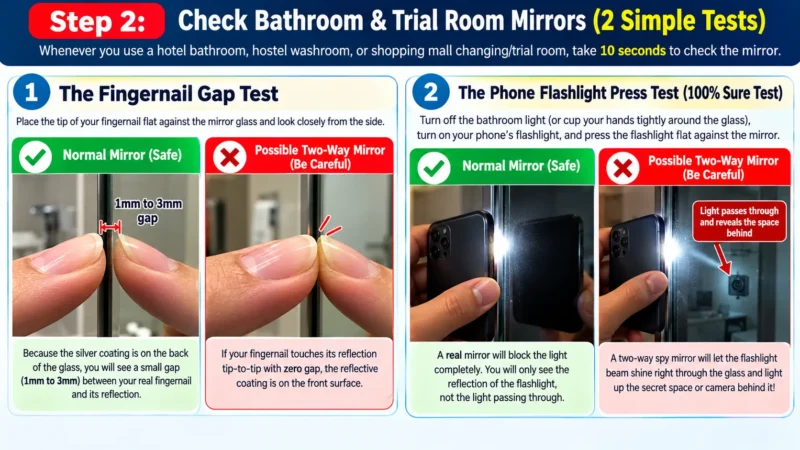
- The Fingernail Gap Test:
- Place the tip of your fingernail flat against the mirror glass and look closely from the side.
- Normal Mirror (Safe): Because the silver coating is on the back of the glass, you will see a small gap (
1mm to 3mm) between your real fingernail and its reflection. - Possible Two-Way Mirror (Be Careful): If your fingernail touches its reflection tip-to-tip with zero gap, the reflective coating is on the front surface.
- The Phone Flashlight Press Test (100% Sure Test):
- Sometimes modern plastic or decorative mirrors also have no gap. To be 100% sure, turn off the bathroom light (or cup your hands tightly around the glass), turn on your phone’s flashlight, and press the flashlight flat against the mirror.
- A real mirror will block the light completely. A two-way spy mirror will let the flashlight beam shine right through the glass and light up the secret space or camera behind it!
Step 3: Use Your Smartphone Flashlight to Spot Hidden Lenses
This is the single best method used by security professionals, because it catches every camera—even if the camera is turned off, runs on a battery, or isn’t connected to Wi-Fi.
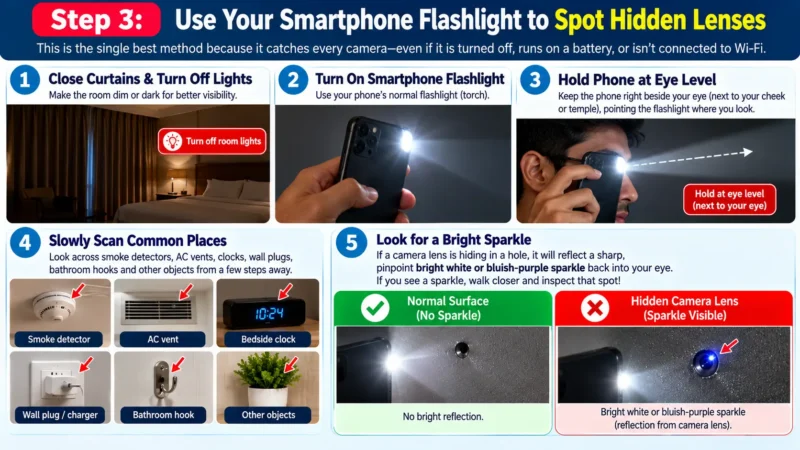
Every camera lens—even one as small as a pinhead—is made of curved glass. When light hits it at the right angle, it shines back like a cat’s eye in the dark.
How to Do the Eye-Level Flashlight Check Properly:
- Close the curtains and turn off the room lights so the room is dim or dark.
- Turn on your smartphone’s normal Flashlight (Torch).
- The Secret Angle (Most People Miss This!): Do not hold your phone down near your waist. Hold your phone up right beside your eye (next to your cheek or temple), pointing the flashlight beam wherever your eyes are looking.
- Slowly look across the smoke detector, air conditioner vent, bedside clock, wall plugs, and bathroom hooks from a few steps away.
- What You Will See: If a tiny camera lens is hiding in a hole, it will reflect a sharp, pinpoint bright white or bluish-purple sparkle straight back into your eye. If you see a sparkle, walk closer and inspect that spot!
Pro Engineer Note: In optics, this is called retroreflection. Because a pinhole lens focuses light onto a flat digital CMOS sensor right behind it, the light bounces straight back along the exact path of the flashlight beam—which is why you only see the glint when the flashlight is held right beside your eye.
Step 4: Check for Night-Vision Lights Using Your Phone’s “Selfie Camera”
How do hidden cameras record in a pitch-dark bedroom at night? They use tiny Infrared (IR) night-vision lights around the lens. Your naked eyes cannot see infrared light in the dark—but your smartphone’s Selfie Camera can!

How to Do the Selfie Camera Check (With the 10-Second TV Remote Test):
- Why You Must Use the Front (Selfie) Camera: On most iPhones and modern Android phones, the main back camera has a special filter that blocks infrared light. However, the front Selfie Camera usually does not have this filter and can see hidden night-vision lights clearly!
- Test Your Phone in 10 Seconds Using the TV Remote:
- Pick up the hotel TV remote control.
- Open your phone’s camera app, switch to the Front (Selfie) Camera, point the tip of the TV remote at the selfie camera, and press any button on the remote.
- Look at your phone screen: you will see a bright white or pinkish-purple flashing light coming from the remote! That is invisible infrared light.
- Scan the Dark Room:
- Now turn off all the room lights and close the curtains so the room is pitch dark.
- Stand near the bed and slowly turn around while looking at your phone’s Selfie Camera screen, pointing it at the ceiling, walls, and TV table.
- If a hidden night-vision camera is active in the dark, it will glow like a bright white or purple dot on your phone screen.

Pro Engineer Note: Covert cameras use either 850nm IR LEDs (which show a tiny, faint dull-red dot if you stare closely in the dark) or 940nm IR LEDs (completely invisible to human vision). Unfiltered smartphone CMOS sensors detect photons up to ~1,000nm, making them sensitive to both
850nmand940nmemitters.
Step 5: Check Your Phone’s Wi-Fi List (No Technical Knowledge Required)
Many hidden cameras connect to Wi-Fi so the person who planted them can watch live on their phone. Here is how both non-technical travelers and tech-savvy pros can check for them:

- For Everyday Users (No App Needed):
- Open your phone’s normal Settings -> Wi-Fi (where you connect to the internet) and look at the list of available Wi-Fi networks nearby.
- Many wireless spy cameras broadcast their own built-in Wi-Fi signal. Look out for strange network names that have full signal strength right inside your room, such as:
IPC-xxxx,IPCam-xxxx, orCAM-xxxxBVCAM,V380-xxxx,HDWiFiCam, orLookCamACCQ-xxxx,YM-xxxx, or a random string of letters and numbers.
- Why “Wi-Fi Scanner Apps” Don’t Always Work in Hotels (Important Warning):
- You may have heard of free network-scanning apps like Fing. In a private Airbnb or homestay, connecting to the house Wi-Fi and running a scan can show you every device connected to that router.
- Pro Tool: If you see an unknown device on an Airbnb router, copy its MAC Address (a 12-character code like
00:12:34:AA:BB:CC) into our free CCTV MAC Address Finder—it will instantly tell you if the device chip was made by a camera company! - However, in most big hotels, the hotel Wi-Fi uses a security setting (Client Isolation) that hides other guests’ devices from your phone. So never assume a room is safe just because a Wi-Fi app shows “0 cameras found”—always do the Flashlight Check (Step 3) too!
Step 6: Carry a Pocket Red-Light Camera Finder (Optional for Frequent Travelers)
If you are a working professional, flight crew member, or solo woman who stays in hotels or PGs frequently, you don’t need an expensive professional bug detector. You can buy a small, keychain-sized Red-LED Optical Camera Finder (usually ₹500 to ₹1,500 / $10 to $20 online).

- It has a small viewing window surrounded by flashing red lights. When you look through the window and scan the room, any hidden pinhole lens lights up as a bright red dot immediately.
Don’t Panic: 3 Normal Hotel Devices That Are NOT Hidden Cameras
When you check a hotel room carefully, it is easy to get scared by normal building electronics. Before you panic, check if the object is one of these three harmless hotel devices:
- The Tiny Dark Window at the Bottom of the TV: Every smart TV has a tiny dark glossy window or red standby light along the bottom edge (near the brand name). That is just the receiver for the TV remote control—it will shine under your flashlight, and it is completely normal.
- White Honeycomb Wall Sensors (AC Motion Sensors): Many modern hotels have a small white plastic sensor on the wall or ceiling with a curved, milky-white textured window. This is a PIR heat/motion sensor that simply tells the air conditioner whether someone is in the room to save electricity—it cannot take photos or video.
- Standard Ceiling Fire Alarms: A real hotel smoke detector is mounted in the center of the ceiling and blinks a tiny red or green light once every 30 to 60 seconds to show the fire system is working. (Only be suspicious if there are two different detectors in the room, or one stuck in a strange spot like a bathroom wall).
What to Do If You Find a Hidden Camera (Safe Step-by-Step Guide for Women & Travelers)
If you discover a real hidden camera lens in your hotel room, Airbnb, or PG, it is completely normal to feel shocked or angry. Your personal safety comes first. Follow these exact 5 steps in order:
1. Cover the Lens Immediately—Do NOT Unplug or Break It!
- Why: Do not pull the device out of the wall or smash it. If someone is watching live on their phone, seeing you pull the camera out tells them you just caught them—and they may rush to your room before you are ready to leave. Also, leaving it plugged in preserves fingerprints and Wi-Fi logs for the police.
- What to Do: Simply throw a thick bath towel, Dupatta, scarf, or piece of tape directly over the object so the camera screen is completely dark and cannot record you while you pack.
2. Take Quick Photo & Video Proof on Your Phone
- Lift the corner of the towel just enough to snap 2–3 close-up photos of the tiny lens, then record a 15-second continuous video: start close up on the hidden lens, then slowly step backward to show the bed/bathroom, the full room, and the room number on the door. (Read our guide on How to Record Video Proof That Holds Up as Legal Evidence).
3. Get Dressed, Pack Your Bags & Leave the Room First
- Critical Rule for Solo Women: Never call the hotel reception desk, PG owner, or Airbnb host while you are still sitting inside that room! If a hotel staff member, manager, or property host planted that camera, calling them first gives them a chance to come to your room, intimidate you, or snatch the camera away to destroy the evidence.
- Quietly pack your bags, walk out of the room with your belongings, and go down to a safe, busy public place (or a trusted friend’s room).
4. Call the Police or Women’s Helpline First
- Once you are in a safe place, call the police so uniformed officers can come inspect the room and seize the hidden camera directly from the wall:
- In India: Dial 112 (Police Emergency), 1091 / 181 (Women’s Helpline—see the full National Portal of India Helpline Directory), or contact the National Commission for Women (NCW) 24×7 Helpline. You can also file an official complaint online (including anonymously for crimes against women) on the National Cyber Crime Reporting Portal (cybercrime.gov.in)., voyeurism and capturing private images without consent is a serious, non-bailable criminal offense.
- In the USA / Canada: Dial
911. - In the UK: Dial
999or101. - In Europe / Australia: Dial
112(EU) or000(Australia).
5. Report to Your Booking App for an Immediate Refund & Relocation
- After informing the police, contact the customer safety team of the app you booked through (Airbnb Trust & Safety, MakeMyTrip, Goibibo, Booking.com, Agoda, or OYO Safety Team) with your photo/video proof and police complaint number to get an immediate refund and a safe hotel transfer.
Frequently Asked Questions (FAQs)
How can I check a shopping mall trial room (changing room) in 30 seconds?
When you step into a clothing store trial room, do three quick checks before changing:
Look up at the ceiling and top corners to make sure no outside store CCTV camera has a downward angle looking over the trial room door or curtain.
Check the clothes hooks and vents for any strange plastic stick-on hooks with a tiny pinhole dot.
Do the Fingernail & Flashlight Press Test on the mirror.
Do free “Hidden Camera Detector Apps” on the Play Store or App Store really work?
Be careful with free apps—many are filled with ads and give false reassurance. Smartphone detector apps cannot magically scan a whole room from the bed; they only use your phone’s compass/magnetic sensor (which only beeps if you rub the phone within 1 inch of a speaker or wire) or your phone’s camera filter. Using your phone’s built-in Flashlight (at eye level) and your Selfie Camera is much more reliable and 100% free.
Can a hidden camera work inside a light bulb?
Only if it is a special larger “bulb camera” screwed into an open fixture pointing downward—which is easy to spot because you will see a small dark round lens right in the middle of the plastic bulb cover when the light is turned off. Standard clear glass filaments or normal sealed LED bulbs do not have cameras inside them.
What is the fastest way to protect my privacy if I am too tired to search the whole room?
If you check into a hotel late at night and are exhausted:
1. Unplug the bedside digital clock and any unknown USB wall adapters and put them inside a drawer.
2. Drape a hand towel over the TV set-top box.
3. Keep the bathroom door closed when sleeping or changing, and turn off the bathroom light when not in use. This takes 30 seconds and blocks the most common hiding spots immediately.