A CCTV (Closed-Circuit Television) camera is a specialized video surveillance camera that captures light through a lens and image sensor and transmits the video signal to a private, closed set of recording devices (a DVR, NVR, or encrypted cloud server) and authorized monitors. Unlike public broadcast television—where any television receiver with an antenna can tune into the signal—a CCTV feed is restricted (“closed”) to specific users on a private cable or network loop.

When homeowners, business owners, or new technicians ask, “How many types of CCTV cameras are there?”, the most practical way to answer is to group them into 12 core camera types across three categories:
- 8 Types by Physical Shape (Form Factor): Dome, Turret (Eyeball), Bullet, PTZ (Pan-Tilt-Zoom), C-Mount / Box, Fisheye (360-Degree), Multisensor, and Discreet / Pinhole cameras.
- 2 Types by Signal & Cabling Architecture: HD Analog (Coaxial) and Network / IP (Ethernet PoE or Wi-Fi).
- 2 Types by Night-Vision & Specialty Imaging: Infrared (IR) vs. Full-Color / Starlight Low-Light cameras, and Thermal / ANPR (License Plate Recognition) cameras.
Below, Drawing on 14 years of field installation and CCTV helpdesk troubleshooting experience, we break down how a CCTV system works, compare all 12 camera types side-by-side, and show you exactly which camera belongs in each location.
How Does a CCTV Camera System Work?
Every modern CCTV installation relies on four connected stages to capture, process, store, and display video:
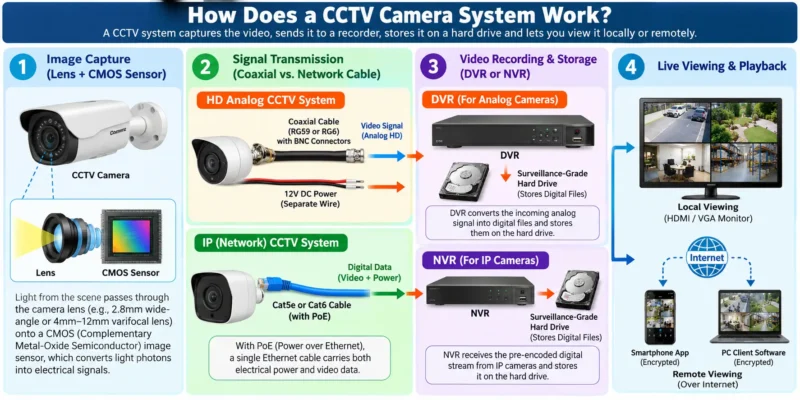
- Image Capture (Lens + CMOS Sensor): Light from the scene passes through the camera lens (such as a wide-angle
2.8mmlens or a narrower4mmto12mmlens) onto a digital CMOS (Complementary Metal-Oxide Semiconductor) image sensor, which converts light photons into electrical signals. - Signal Transmission (Coaxial vs. Network Cable):
- In an HD Analog CCTV system, the camera sends an uncompressed high-definition video signal over a coaxial cable (RG59 or RG6) using BNC connectors to a recorder, while a separate
12V DCwire supplies power. - In an IP (Internet Protocol) CCTV system, the camera’s onboard processor compresses the video inside the camera (using codecs like H.264, H.265, or H.265+) and sends digital data packets over a Cat5e or Cat6 Ethernet cable. With PoE (Power over Ethernet), a single Ethernet cable carries both electrical power and video data.
- In an HD Analog CCTV system, the camera sends an uncompressed high-definition video signal over a coaxial cable (RG59 or RG6) using BNC connectors to a recorder, while a separate
- Video Recording & Storage (DVR or NVR):
- Analog cameras connect to a DVR (Digital Video Recorder), which converts the incoming analog signal into digital files and writes them to a surveillance-grade internal hard drive. (See our complete guide on What Is a DVR and How Many Types of DVR Are There).
- IP cameras connect to an NVR (Network Video Recorder) or PoE switch, which receives the pre-encoded digital stream and stores it on the hard drive.
- Live Viewing & Playback: You view live feeds and search recorded clips locally on an HDMI/VGA monitor connected to the recorder, or remotely via an encrypted smartphone app or PC client software.
Quick Comparison Table: All Types of CCTV Cameras
Use this quick-reference matrix to compare each CCTV camera type by its best mounting location, viewing coverage, and primary field limitation:
| # | CCTV Camera Type | Classification | Best Mounting Location | Typical Coverage / Range | Key Advantage | Main Limitation |
| 1 | Dome Camera | Form Factor | Indoor ceilings, retail, lobbies, elevators | 90° to 110° fixed or varifocal (10m–30m IR) | Vandal-resistant (IK10 options); hard to tell where lens points | Glass bubble causes IR glare if dirty or scratched outdoors |
| 2 | Turret (Eyeball) Camera | Form Factor | Indoor ceilings, outdoor eaves, porches, shops | 90° to 110° (20m–40m IR/White light) | Separate lens and IR window eliminates night-vision glare | Slightly lower impact resistance than an IK10 polycarbonate dome |
| 3 | Bullet Camera | Form Factor | Outdoor walls, gates, parking lots, perimeters | 45° to 105° (30m–80m long-range IR) | Strong visual deterrent; built-in sun/rain lip; long IR range | Easier for an intruder with a pole to knock out of alignment |
| 4 | PTZ (Pan-Tilt-Zoom) | Form Factor | Warehouses, campuses, large parking yards | 360° pan, 90°+ tilt, 12x to 40x optical zoom | Tracks moving targets and zooms optically onto distant details | Only records the direction it is currently pointing; higher cost |
| 5 | C-Mount / Box Camera | Form Factor | Toll booths, long corridors, industrial plants | Custom (2.8mm to 100mm+ interchangeable lens) | Accepts specialized telephoto or macro lenses | Bulky; requires a separate weatherproof housing for outdoor use |
| 6 | Fisheye (360°) Camera | Form Factor | Open-plan offices, retail aisles, intersections | 180° wall or 360° ceiling panoramic view | Eliminates blind spots with a single camera cable drop | Lower pixel density at the edges; requires NVR/software de-warping |
| 7 | Multisensor Camera | Form Factor | Building corners, large intersections, stadiums | 180°, 270°, or 360° via 2 to 4 separate lenses | Combines wide coverage with high-megapixel clarity (16MP–32MP) | Requires PoE+ (802.3at) or PoE++ (802.3bt) and high storage |
| 8 | Discreet / Pinhole Camera | Form Factor | Bank ATMs, cash-handling booths | 70° to 90° close-range view | Blends into equipment where standard housings won’t fit | No built-in IR LEDs; strict legal and privacy restrictions apply |
| 9 | HD Analog (TVI/CVI/AHD) | Signal Type | Budget home/shop installs, coax retrofits | 2MP (1080p) up to 8MP (4K) over coax | Reuses existing coaxial wiring; zero network lag; lower hardware cost | Requires separate power wire (Siamese cable); fewer onboard AI tools |
| 10 | IP Camera (PoE / Wi-Fi) | Signal Type | Modern homes, offices, multi-building sites | 2MP up to 12MP+ over Cat6 or Wi-Fi | Single-cable PoE setup; smart AI analytics; easy network expansion | Higher upfront cost; requires basic IP subnet and cybersecurity setup |
| 11 | Day/Night IR vs. Full-Color | Lighting Tech | Driveways, dark alleys, poorly lit entrances | 20m–60m in low light or pitch darkness | Captures usable B&W (IR) or 24/7 color evidence at night | Full-color cameras often use a visible warm LED light at night |
| 12 | Thermal & ANPR/LPR | Specialty Tech | Entry gates, perimeters, industrial substations | 10m–50m (ANPR) or 100m–1,000m+ (Thermal) | Reads fast-moving vehicle plates or detects heat signatures in fog/smoke | Specialized single-purpose cameras; significantly higher cost |

Part 1: Types of CCTV Cameras by Shape (Form Factor)
The outer housing of a camera is not just about aesthetics—it dictates how well the camera resists rain, dust, spider webs, infrared glare, and physical tampering.
1. Dome CCTV Cameras
Named after their hemispherical clear polycarbonate bubble, dome cameras are most commonly mounted on indoor ceilings in offices, retail shops, hotels, and apartment hallways.
- Why Installers Use Them: The tinted or smoked dome cover makes it difficult for bystanders to see exactly which direction the lens is pointing, and heavy-duty models carry an IK10 vandal-resistance rating (capable of withstanding a 20-joule physical impact, equivalent to a 5 kg weight dropped from 40 cm).
- Field Technician Warning (IR Reflection): Avoid mounting standard glass-bubble dome cameras outdoors in dusty or rainy areas unless necessary. When dust, water spots, or scratches accumulate on the outside of the plastic bubble, or if the internal foam ring around the lens shifts, the infrared (IR) LEDs reflect off the inside of the dome glass and create a foggy white halo at night.
2. Turret (Eyeball) CCTV Cameras
Often called eyeball cameras, a turret camera uses a ball-and-socket joint sitting inside a flat-faced circular housing—without a curved glass bubble covering the front.
- Why Installers Prefer Them: Because the camera lens and the infrared/warm-light LED window sit behind flat, separated glass panels, turret cameras completely eliminate the internal IR reflection issue that plagues dome cameras. Their three-axis ball joint also allows you to mount them cleanly on either a horizontal ceiling/eave or a vertical wall without needing an L-bracket.
- Best Use Case: Residential soffits/eaves, shopfronts, covered walkways, and indoor rooms where you want a compact footprint with crystal-clear night vision.
3. Bullet CCTV Cameras
Bullet cameras have a long, cylindrical barrel housing with an integrated sunshield/rain lip on top and an adjustable mounting arm at the back.
- Why Installers Use Them: Bullet cameras are built to be seen—their unmistakable profile acts as an immediate psychological deterrent against trespassers. Because their housing is larger than a dome or turret, manufacturers can pack larger telephoto lenses and stronger infrared arrays inside, giving bullet cameras a longer night-vision range (often 40m to 80m).
- Field Technician Warning: Because bullet cameras stick out on an arm, spider webs frequently build across the front sunshield lip (attracted by the warmth of the IR LEDs), and someone with a long stick can push the camera out of alignment if it is mounted below 8 to 10 feet (2.5 to 3 meters).
4. PTZ (Pan-Tilt-Zoom) Cameras
A PTZ camera features motorized servos that allow a security operator—or an automated AI tracking rule—to Pan (rotate horizontally up to 360 degrees), Tilt (move vertically up and down), and Zoom in optically on distant targets.
- Optical Zoom vs. Digital Zoom: Unlike standard fixed cameras where pinching to zoom on your phone simply enlarges pixels (digital zoom), a PTZ camera physically moves internal glass lens elements (
12x,25x, or40xoptical zoom) so you can read a license plate or identify a face over 100 meters away without losing clarity. - Field Technician Warning: A PTZ camera only records the area it is actively pointing at. Never replace three fixed perimeter cameras with a single PTZ camera unless you use a dual-lens “TandemVu / Duo” PTZ (which combines a fixed wide-angle lens on top with a moving PTZ lens on the bottom).
5. C-Mount / Box CCTV Cameras
Box cameras (historically called C-Mount or CS-Mount cameras) consist of a rectangular camera body with a threaded front ring that accepts interchangeable lenses.
- Best Use Case: Industrial inspection lines, highway monitoring, or long-distance gate surveillance where a standard
2.8mmor4mmlens cannot reach and a specialized50mmor100mmtelephoto lens is required. For outdoor use, the box camera must be placed inside a separate weatherproof enclosure with a heater/blower.
6. Fisheye (360-Degree Panoramic) Cameras
A fisheye camera uses an ultra-wide-angle lens (typically 1.1mm to 1.8mm) to capture a full 360-degree bird’s-eye view when mounted in the center of a ceiling, or a 180-degree view when mounted on a wall.
- Best Use Case: Retail store floors, classroom centers, warehouse intersections, and small lobbies where you want complete situational awareness from a single cable run. Modern NVRs and VMS software “de-warp” the circular image into four virtual flat views (
ePTZ).
7. Multisensor Panoramic Cameras
Unlike a fisheye camera (which stretches one sensor across 360 degrees), a multisensor camera houses two, three, or four independent camera modules inside a single housing, stitching their images together into a seamless 180-degree, 270-degree, or 360-degree high-resolution panorama.
- Best Use Case: Large parking lots, building corners, and school courtyards where you want wide coverage without sacrificing pixel density. Note that multisensor IP cameras typically draw more power and require PoE+ (IEEE 802.3at) or PoE++ (IEEE 802.3bt).
8. Discreet / Pinhole (ATM & Commercial) Cameras
Pinhole or miniature modular cameras place a tiny lens assembly at the end of a flexible cable connected to a hidden main processor box.
- Best Use Case: Bank ATMs, teller windows, and high-security point-of-sale kiosks where a full-sized camera housing cannot fit.
- Legal Warning: Discreet cameras must only be used in lawful commercial security applications with proper surveillance signage. Installing hidden cameras in private areas (such as restrooms, changing rooms, or private residences without consent) is strictly illegal.
Part 2: Types of CCTV Cameras by Signal & Connection Technology
Beyond physical shape, every CCTV camera falls into one of two signal architectures: HD Analog or Network / IP.
9. Analog & HD-over-Coax CCTV Cameras (CVBS, HD-TVI, HD-CVI, AHD)
A common misconception online is that all analog CCTV cameras are stuck at grainy standard definition or 720p. In reality, analog CCTV exists in two generations:
- Legacy Analog (CVBS / 960H): Older standard-definition cameras used in the 1990s and 2000s. These are obsolete today.
- Modern HD-over-Coax (HD-TVI, HD-CVI, AHD): Introduced by major manufacturers (such as Hikvision’s TurboHD/TVI and Dahua’s HDCVI), modern HD Analog cameras transmit 2MP (1080p), 4MP, 5MP, and even 8MP (4K) video over traditional RG59 or RG6 coaxial cable up to 300–500 meters without boosters.
- Cabling & Power: Typically wired using 3+1 or RG59 Siamese cable, which bundles one coaxial video core with a two-core power wire connected to a centralized
12V DCSMPS power supply box at the DVR. Some newer models also support PoC (Power over Coax).
10. Network / IP Cameras (Wired PoE & Wireless Wi-Fi / 4G)
An IP (Internet Protocol) camera is a standalone networked computer with a lens. It captures the image, encodes it digitally inside the camera, and transmits it over a Local Area Network (LAN) or the internet. (For a deep dive into IP camera internals, read our Complete Guide to What Is an IP Camera).
- Wired PoE IP Cameras: Connect to a PoE Switch or PoE NVR using a single solid bare copper Cat5e or Cat6 Ethernet cable up to 100 meters (328 feet) per standard Ethernet segment. Standardized Active PoE (IEEE 802.3af/at) safely negotiates
48V DCpower and data over the same cable. - Wireless (Wi-Fi & 4G LTE) IP Cameras: Transmit video over
2.4 GHz / 5 GHz Wi-Fior a4G cellular SIM card. Keep in mind that most “wireless” Wi-Fi cameras still require a physical power cord plugged into a wall outlet unless they run on a rechargeable battery and solar panel. (Compare both options in our guide on Wired vs. Wireless CCTV Camera Systems). - Brand Compatibility (ONVIF): Most professional IP cameras support ONVIF (Profile S for video streaming, Profile G for edge storage, Profile T for H.265/WDR imaging, and Profile M for AI metadata), allowing you to connect a camera from one brand to an NVR from another brand. Learn how to configure cross-brand setups in our guide: What Is ONVIF in CCTV? Camera Compatibility Explained.
Part 3: Types of CCTV Cameras by Night Vision & Specialty Function
11. Infrared (IR) Day/Night vs. Full-Color / Starlight Cameras
Available in both HD Analog and IP models, low-light cameras use three distinct technologies to record in the dark (covered in detail in our guide: Can CCTV Cameras See in the Dark?):
- Standard IR (Infrared) Day/Night Cameras: During the day, an automatic mechanical IR-Cut Filter (ICR) blocks infrared light so daytime colors look natural. At night, the filter moves aside with an audible click, the built-in
850nminfrared LEDs turn on, and the camera records a sharp black-and-white image in total darkness. - Starlight / Ultra-Low-Light Cameras: Use a larger CMOS sensor (such as
1/1.8"instead of1/2.8") and a wide-aperture lens (F1.2orF1.0) to maintain full color video using only minimal ambient light from a distant streetlamp or porch light. - Warm-Light Full-Color Cameras (e.g., ColorVu / Full-Color / Smart Dual-Light): Pair an ultra-sensitive sensor with a soft, visible warm-white LED light to record 24/7 full-color footage even in pitch darkness—critical for identifying the color of a suspect’s clothing or a vehicle. Smart Dual-Light models stay in invisible IR mode at night and only switch on the white light when a human or vehicle enters the frame.
12. Thermal & ANPR / LPR (License Plate Recognition) Cameras
- ANPR / LPR Cameras: Standard security cameras often see a glowing white blur when car headlights shine directly into the lens at night. Dedicated ANPR (Automatic Number Plate Recognition) cameras use specialized fast shutter speeds (
1/1000sto1/10,000s), HLC (Highlight Compensation), and tuned IR wavelengths to capture readable license plates on moving vehicles day or night. (See how to fix headlight glare on standard cameras in WDR vs. BLC vs. HLC in CCTV). - Thermal Imaging Cameras: Instead of visible light, thermal cameras detect infrared heat radiation emitted by objects, people, or overheated electrical transformers. They can detect a human intruder through total darkness, heavy fog, smoke, or light foliage across hundreds of meters.
Step-by-Step: How to Choose the Right CCTV Camera for Your Site
Before buying cameras or drilling holes, follow this 5-step field checklist to avoid the Top 10 CCTV Installation Mistakes:
- Map Each Camera’s Goal Using DORI (Detect vs. Identify):
- Ask what each camera needs to achieve. A 2.8mm wide-angle lens gives you a broad
100°–110°overview of a room or yard, but faces become small beyond 6 to 8 meters. For a driveway gate, cash register, or narrow hallway, choose a 4mm, 6mm, or motorized varifocal (2.8–12mm) lens to concentrate pixels on faces and license plates.
- Ask what each camera needs to achieve. A 2.8mm wide-angle lens gives you a broad
- Match the Housing to the Environment (Check IP Rating):
- Indoors: Use Dome or Turret cameras.
- Outdoors: Use Turret or Bullet cameras rated at least IP66 (protected against powerful water jets) or IP67 (protected against temporary water immersion up to 1 meter) under the IEC 60529 Ingress Protection standard.
- Choose Your Cabling Platform (HD Coax vs. PoE IP):
- If you are upgrading an older building that already has intact RG59 coaxial cables inside the walls, HD Analog (5MP/8MP TVI or CVI) saves significant labor cost.
- For any new installation, PoE IP Cameras over solid bare copper Cat6 cable (never cheap Copper-Clad Aluminum / CCA cable, which causes voltage drop and night-vision dropouts) offer cleaner wiring, higher resolutions, and smart human/vehicle AI alerts.
- Check Difficult Lighting Conditions:
- If an indoor camera points toward a glass entrance door with bright sunlight outside, choose a camera with True WDR (120dB Wide Dynamic Range) so visitors’ faces aren’t silhouetted in dark shadow.
- Calculate Your Hard Drive Storage Before Buying:
- Higher-resolution cameras (
4MPand8MP/4K) consume significantly more storage space than2MP (1080p)cameras. Enable H.265 / H.265+ compression on your DVR/NVR and run your camera count through our free HDD Calculator to size your surveillance hard drive accurately.
- Higher-resolution cameras (
Essential Safety, Cybersecurity & Legal Warnings
Installing a CCTV system carries important network security, electrical, and legal responsibilities:
- Cybersecurity Warning (Never Use Default Passwords or Raw Port Forwarding): Always set a strong, unique administrator password during initialization. Avoid opening router ports (
Port 80,Port 554,Port 8000/37777) via manual port forwarding or UPnP to view cameras over the internet—exposed DVR/NVR ports are constantly scanned by automated botnets. Instead, use the manufacturer’s encrypted P2P cloud service with Two-Factor Authentication (2FA) enabled, or connect through a private VPN, and keep camera firmware updated per CISA IoT Security Guidelines. - Electrical & PoE Cabling Safety: When using PoE IP cameras, use IEEE 802.3af/at compliant PoE switches or NVRs. If using 12V passive power injectors, never plug an energized passive injector lead into a standard laptop or router LAN port, as unregulated voltage can damage non-PoE network interface cards. Always route outdoor cables inside weatherproof PVC conduit and use weatherproof junction boxes to protect RJ45 and BNC connections from moisture corrosion and short circuits.
- Privacy, Signage & Audio Laws: Never aim cameras into neighbors’ private windows or install cameras in areas where individuals have a legal expectation of privacy (bathrooms, locker rooms, changing areas). In most jurisdictions (including India, the UK, and the US), commercial properties must display clear CCTV Surveillance Disclaimer Signage, and recording audio via built-in camera microphones may require explicit consent under local wiretapping and data-protection laws. For court admissibility rules, see our guide on Rules for Using CCTV Footage as Evidence.
Frequently Asked Questions (FAQs)
Which type of CCTV camera is best for home use?
For most homes, a combination of PoE IP Turret cameras (mounted under roof eaves and porches to prevent IR glare) and Bullet cameras (mounted on long driveways or perimeter walls as a visible deterrent) works best. Choose 4MP or 8MP (4K) cameras with Smart Dual-Light (IR + Warm White Light) and human/vehicle detection to minimize false motion alerts from trees or pets.
What is the difference between a Dome camera and a Turret camera?
A Dome camera encloses the lens and infrared LEDs inside a single curved glass or polycarbonate bubble, which offers strong vandal resistance (IK10) indoors but can suffer from infrared reflection if the dome gets dirty outdoors. A Turret (eyeball) camera has no outer bubble and separates the lens from the IR LED window behind flat glass, delivering cleaner night vision outdoors while maintaining a compact, tamper-resistant shape.
Can Analog CCTV cameras record in HD or 4K?
Yes. While old legacy CVBS analog cameras were limited to standard definition, modern HD-over-Coax analog cameras (HD-TVI, HD-CVI, and AHD) record in 1080p (2MP), 4MP, 5MP, and up to 8MP (4K) over standard coaxial cable when paired with a compatible HD DVR or Hybrid XVR.
Do CCTV cameras work without an internet connection?
Yes. A wired CCTV system (whether HD Analog with a DVR or PoE IP with an NVR) records 24/7 to its internal surveillance hard drive on a closed local circuit without needing internet access. An internet connection is only required if you want to view live feeds remotely on your smartphone, receive mobile push alerts, or back up clips to the cloud.